Your app loads a bit slower every quarter. Releases take longer. Cloud bills grow faster than revenue. You add more servers, tweak code, and change tools, but nothing really fixes it. The problem usually is not your feature list. It is your architecture.
This guide is for teams who have already shipped, already have users, and are now paying the price for early architecture shortcuts.
Recent research shows that a large share of IT and software projects still run over budget or miss expectations. Some studies report that around half of projects go over budget, with average overruns close to one fourth of the original plan. At the same time, tests on page speed show that even a 1 second delay in load time can cut conversions by around 7%.
When teams jump into coding without a clear web app architecture, they pay later. They see more incidents. They fight scaling issues. They spend more just to keep the system alive.
This guide walks through a clear and practical approach to modern web application architecture that balances performance, security, cost, and delivery speed. You will see simple models, step by step design moves, and checklists you can use with your team.
To start, let’s align on what modern web application architecture really means in 2026.
What is Modern Web Application Architecture in 2026
Modern web application architecture is the structured blueprint of how your web app works under the hood. It shows how the client, APIs, services, data stores, and infrastructure talk to each other so that users see a fast and stable experience. Instead of “just hosting a web app”, you shape clear layers, patterns, and responsibilities.
Here is a useful way to think about it:
- If your system only works when the same two engineers are awake, that is not architecture. That is tribal knowledge.
In 2026, modern web application architecture exists less to impress engineers and more to control risk. Good architecture limits blast radius when something goes wrong. It makes failures visible, contained, and recoverable instead of mysterious and system-wide.
At a high level, good web application architecture for 2026 aims to:
-
Serve users quickly, even under heavy load
-
Keep data safe and meet compliance rules
-
Stay reliable with minimal downtime
-
Help developers ship changes often and safely
-
Keep cost predictable as traffic and features grow
Modern web app architecture also responds to new realities. Cloud native options, multi-region deployments, and managed services are now standard. You face more demanding UX expectations and stricter privacy and data residency demands than even a few years ago.
In other words, the architecture of modern web applications is no longer a one-time diagram. It is an ongoing design of how your application web architecture supports the product, the team, and the business over time.
Core Components and Layers of Modern Web App Architecture
Most modern web app architecture designs share a similar layered view. These layers keep roles clear and make it easier to scale and change the system. When you talk about web app architecture with your team, this model is a good starting point.
Core components of a modern web application (that actually runs in production)
Most production systems in 2026 are built from a common set of building blocks:
-
Edge/CDN: serves static assets, reduces latency, absorbs spikes
-
Load balancer / reverse proxy: routes traffic and terminates TLS
-
API gateway: auth, routing, rate limits, request policies
-
Auth/Identity: SSO/OAuth, roles, service-to-service identity
-
App runtime: containers/Kubernetes or serverless functions
-
Primary data store: SQL/NoSQL depending on domain needs
-
Cache: Redis/memory cache for hot reads and session/state patterns
-
Async processing: queues/event bus for background work and decoupling
-
Object storage: file uploads, media, exports
-
Observability: logs, metrics, traces + alerting
-
Config/secrets + release controls: feature flags, secret management, CI/CD
Not every app needs all of these on day one, but most scaling problems come from adding them late under pressure.
High level view of application web architecture
A typical structure for web application architecture in 2026 looks like this:
-
Client / Presentation layer
-
API / Gateway layer
-
Service / Business logic layer
-
Data / Storage layer
-
Infrastructure / Cloud platform
-
Cross cutting concerns such as auth, logging, monitoring, caching
Each layer in this application web architecture has its own job, tools, and owners.
Layers and 2026 tech examples
| Layer |
Role in Web Application Architecture |
Common 2026 Choices |
| Client / Presentation |
UI, UX, user journeys |
SPAs, SSR apps, micro frontends, PWAs |
| API / Gateway |
Request routing, auth, rate limits |
API gateways, BFF pattern, GraphQL, REST |
| Service / Business Logic |
Core rules and workflows |
Modular monolith, microservices |
| Data / Storage |
Persist, query, and cache data |
SQL, NoSQL, distributed cache |
| Infra / Platform |
Run, scale, and secure the system |
Containers, Kubernetes, serverless |
| Cross-cutting Concerns |
Security, observability, reliability |
IAM, logs, metrics, traces, feature flags |
This layered model is at the heart of many advanced web application architecture designs.
Why clean separation of layers matters
When you keep layers separate in a modern web application architecture, you:
- Scale parts of the system without touching everything
- Troubleshoot faster because failure points are clearer
- Deploy changes by area rather than as one big risky release
- Give teams ownership over parts of the web app architecture
This structure also makes it easier to adopt new technologies or services inside a stable application web architecture.
Key Types and Patterns in Advanced Web Application Architecture
Beyond layers, you need to choose main structural patterns. Advanced web application architecture is not about using every trend. It is about picking shapes that fit your product’s age, size, and risk profile.
Core structural patterns
1. Monolith
-
One deployable unit that holds UI, logic, and data access.
-
Fits early stage products, small teams, and simple domains.
-
Risk: can turn into a “big ball of mud” if no modularity is enforced.
2. Modular monolith
-
Single deployable app, but with clear internal modules and boundaries.
-
Good for growing SaaS products that need structure but not full microservices yet.
-
Risk: if boundaries blur, you lose most of the benefit.
3. Microservices
-
Many small services, each with a focused purpose.
-
Fits complex domains, high scale needs, and larger teams.
-
Risk: more operational overhead, more deployments, and more complex data flows.
Choosing between these options is one of the biggest web application architecture calls you will make.
Modern runtime and integration patterns
Modern web app architecture also involves how services talk to each other:
-
Event driven flows with queues or pub sub for async work
-
Serverless and functions for bursty workloads or glue logic
-
API first and headless services so other apps can reuse core capabilities
These patterns show up in many architecture of modern web applications because they support scale and flexibility.
Client side and delivery patterns
On the front end, advanced web application architecture often mixes:
-
Server side rendering, client side rendering, or hybrid approaches
-
Micro frontends for large teams that own different areas of the UI
-
Multi tenant UI patterns for SaaS platforms
These choices shape how your web app architecture feels to users and how often you can ship.
How to pick patterns for your context
Match patterns to:
Err on the side of simpler patterns when in doubt. You can move from monolith to modular monolith or microservices later, but you pay a real cost each time you increase complexity.
Step by Step Web App Architecture Design Process
To make modern web application architecture work in practice, teams need more than diagrams. They need a repeatable design process that forces decisions early and exposes risk before it becomes expensive.
This is the step-by-step flow we use to design web app architecture that survives real production pressure, not just early demos.
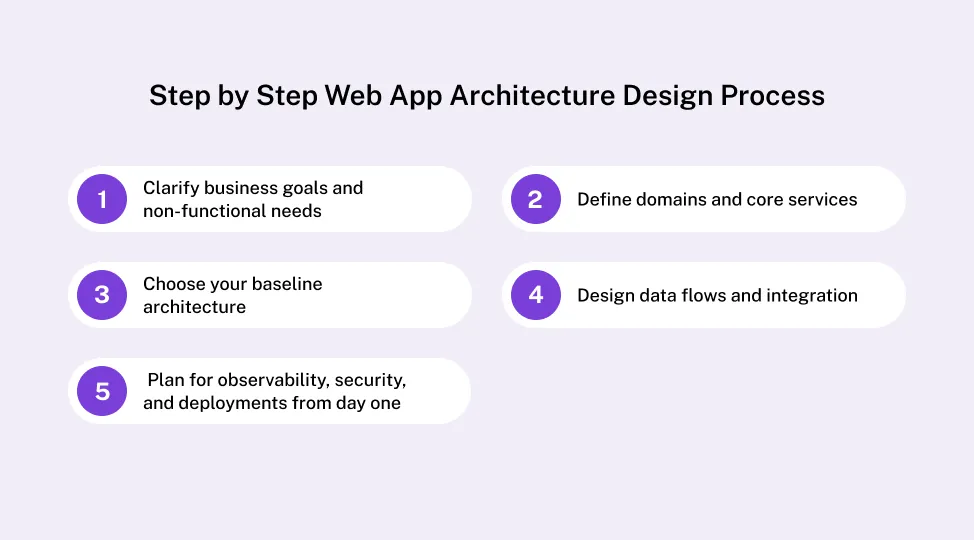
Step 1: Clarify business goals and non-functional requirements
Before choosing tools or drawing system diagrams, lock down the business context that will shape every architectural decision.
Capture:
- Who the primary users are and the core actions they must complete
- Expected traffic patterns and growth over the next 12–24 months
- Service level expectations such as uptime, response time, and recovery targets
- Data rules covering privacy, retention, residency, and compliance
- Budget and delivery constraints for this stage of the product
Validation gate:
If you cannot clearly answer the following, stop and fix this first:
- What happens to the business if the app is slow or unavailable for one hour?
- Which data types would cause real damage if exposed or lost?
- What growth assumptions are we actually designing for, not hoping for?
If these answers are vague, your web app architecture will be reactive by default.
Step 2: Define domains and core system boundaries
Next, break the product into clear functional domains. These represent how the business actually works, not how the code is currently written.
Common examples include:
- Authentication and identity
- Billing and subscriptions
- Core product workflows
- Search, reporting, and analytics
- Integrations and external APIs
Even if you deploy everything as a single application, your architecture of modern web applications should reflect these boundaries. This prevents business rules from bleeding across the system and makes future changes safer.
Validation gate:
If one domain cannot fail or change without impacting unrelated areas, your boundaries are not real yet.
Step 3: Choose a baseline architecture with a time horizon
Now select the baseline structure for your web application architecture: monolith, modular monolith, or microservices.
This decision should not be aspirational. It should be grounded in what your team can build, operate, and evolve.
Use this rule:
If the architecture will not realistically support the next 18–24 months of change, it is not a valid baseline.
Ask:
- Can we test and deploy this model frequently?
- Do we have the skills to run it in production, including failures?
- Does this reduce risk now, not increase it?
Many teams fail here by choosing an architecture they want to grow into instead of one that fits their current reality.
Step 4: Design data flows and integration Paths
Map how a real user request moves through your application web architecture:
- From browser or mobile client
- Through gateways or APIs
- Into services or modules
- Into data stores and back
Be explicit about where interactions must be synchronous and where asynchronous processing is safer.
A common failure pattern looks like this:
Teams start with synchronous calls everywhere, then add queues later under pressure. By that point, retries, duplication, and partial failures are already baked into production behavior.
Validation gate:
If a single slow dependency can block the entire user flow, the design needs adjustment.
Step 5: Plan for observability, security, and deployments from day one
This is where many architectures quietly fail.
Logs, metrics, traces, access control, and deployment strategy are not “later” concerns. They are structural decisions.
Strong modern web application architecture bakes in:
- Logs, metrics, and traces for each service or module
- Dashboards and alerts for key paths
- Secure defaults for auth, secrets, and data at rest and in transit
- CI and CD pipelines that can roll out and roll back safely
If observability is treated as a future improvement, incidents will teach it to you the hard way.
Validation gate:
If you cannot explain how you will detect, diagnose, and recover from a failure, the architecture is incomplete.
Use this process as an operating checklist
This step-by-step flow is not a one-time exercise. Revisit it as the product evolves, traffic grows, and team structure changes.
Used consistently, it becomes an internal Web App Development guide that helps teams make architecture decisions deliberately instead of reacting to outages, scaling limits, or cost surprises.
Performance, Security, and Reliability in Modern Web Application Architecture
Once the structure is clear, you need to focus on three cross cutting themes: performance, security, and reliability. They are not addons. They are part of any serious modern web app architecture.
Performance and scalability principles
Key questions to ask:
-
How will the app behave at ten times current traffic
-
Where can caching help at client, edge, and server level
-
Do we need a content delivery network for static assets
-
How will databases scale: vertical growth, read replicas, sharding
Small choices in web application architecture here can have a big impact on speed and cost.
Security by design
Security works best when it starts with the architecture of modern web applications, not after an audit. Make sure you:
-
Use strong identity and access control for users and services
-
Keep secrets and keys out of code and out of logs
-
Encrypt data in moving and at rest by default
-
Plan for regular patching and dependency updates
This approach makes modern web application architecture a safer place to build on.
Reliability and observability
Reliability means more than uptime. It means you can see issues and act before users feel them. Aim for:
-
Clear service level indicators and simple error budgets
-
Health checks for each service and dependency
-
Graceful degradation when a feature or service fails
Observability helps you understand the real state of your web application architecture based on the data it produces, not guesswork.
Simple checklist table
| Area |
Key Question to Ask |
| Performance |
How will the app behave at ten times load |
| Security |
What happens if a token or secret leaks |
| Reliability |
How fast can we detect and recover from failures |
Use this table as a quick review for any modern web app architecture you design or inherit.
Cost, ROI, and Tradeoffs in Web Application Architecture
Every architectural decision carries a cost. Some of those costs appear immediately on cloud invoices or delivery timelines. Others surface months later as slower execution, higher operational load, and growing organizational friction. A strong modern web application architecture makes both visible early, so tradeoffs are deliberate rather than accidental.
How architecture shapes Web Application Development Cost
Architecture influences cost across three major dimensions:
Build cost
More complex patterns such as microservices require additional setup, tooling, coordination, and testing. This increases initial development time and demands more experienced engineers from day one.
Cloud and runtime cost
Multi-region deployments, chatty service communication, heavy data transfer, and over-provisioned infrastructure can quietly inflate monthly bills. Architecture decisions directly affect how efficiently compute, storage, and networking are used.
Maintenance and operational cost
As systems grow, poorly chosen patterns increase on-call load, slow incident response, and raise the cost of routine upgrades, security patches, and refactors. Over time, these costs often exceed the original build investment.
Understanding these layers makes Web Application Development Cost easier to forecast and explain to business stakeholders.
Costs that don’t show up in cloud bills
Some of the most expensive consequences of weak web application architecture never appear on a cost dashboard.
These hidden costs often include:
- Slower onboarding for new engineers
When system boundaries are unclear, new team members take longer to become productive and rely heavily on tribal knowledge.
Teams avoid touching core flows because small changes feel risky, leading to workarounds, duplication, and growing technical debt.
- Release coordination overhead
As dependencies increase, shipping even small changes requires more meetings, approvals, and manual checks.
Poor observability and tangled dependencies extend outages and increase customer and revenue impact.
Engineering time spent stabilizing the system is time not spent shipping features or improving user experience.
For leadership teams, these invisible costs often matter more than raw infrastructure spend.
Typical architectural tradeoffs
Most architecture decisions involve choosing which costs you pay now and which you defer.
Common examples include:
-
Monolith vs microservices
Faster delivery and lower overhead today versus flexibility and isolation at larger scale.
-
Single region vs multi-region
Lower infrastructure costs versus higher resilience and availability.
-
Managed services vs custom infrastructure
Reduced operational burden versus deeper control and tuning.
-
None of these choices are inherently right or wrong. The risk comes from making them without aligning to product stage, team maturity, and business tolerance for failure.
Simple comparison table
| Choice |
Lower Initial Cost |
Long-Term Flexibility |
Typical Fit |
| Monolith |
Yes |
Limited |
MVPs, early-stage SaaS |
| Modular Monolith |
Medium |
Medium to high |
Growing products |
| Microservices |
Higher |
High |
Large, complex platforms |
If you want to understand how these decisions compound over time, use our Web Application Development Cost insights to model how your architecture choices will affect budget, delivery speed, and risk across the next three to five years.
When to Partner with Experts on Your Application Web Architecture
Some teams can grow their own modern web app architecture in house. Others benefit from outside help, especially when risk and complexity rise.
Signs you should not go alone
You may want expert support when:
-
You handle sensitive or regulated data and face audits
-
You need multi region or multi tenant deployments
-
Your platform has become mission critical and downtime is costly
-
You are planning a major move, such as monolith to microservices
In these cases, architecture of modern web applications is too important to leave to chance.
What an expert partner does differently
A strong partner helps you:
-
Run structured discovery and risk mapping sessions
-
Build reference designs and small proofs of concept
-
Define standards for logging, security, and deployments
-
Document application web architecture so teams can maintain it
You can talk to Web Application Development Services and get a practical architecture roadmap tailored to your product and your stage.
Practical Architecture Scenarios and Sample Blueprints
To make modern web application architecture less abstract, it helps to see a few common scenarios. Here are three simple blueprints you can adapt.
Scenario 1: Startup MVP
Needs:
-
Fast launch
-
Limited budget
-
Small engineering team
Suggested style:
This modern web app architecture keeps moving parts low while you search for product market fit.
Scenario 2: Scaling SaaS platform
Needs:
-
Multi tenant support
-
Frequent releases
-
Growing team ownership
Suggested style:
-
Modular monolith with clear domains and shared libraries
-
Selective extraction of microservices for hot spots like billing or analytics
-
Strong observability and feature flags
This advanced web application architecture gives more flexibility without jumping into full microservices too early.
Scenario 3: Enterprise grade platform
Needs:
Suggested style:
-
Microservices with event driven integration where it fits
-
API gateways and BFF patterns for different clients
-
Multi region data strategy with strong governance
This kind of web app architecture demands more investment in process, tooling, and skills, but it supports large scale and regulated use.
Scenario comparison table
| Scenario |
Recommended Architecture Style |
Key Risks to Manage |
| Startup MVP |
Monolith or modular monolith |
Over-engineering, early complexity |
| Growing SaaS |
Modular monolith plus selective services |
Fragmentation, data duplication |
| Enterprise |
Microservices, event-driven, multi-region |
Operational overhead, governance |
Use these scenarios as starting points, not rigid rules, when shaping your own modern web application architecture.
Turn Your Modern Web Application Architecture into a Roadmap
Modern web application architecture is more than a diagram for a slide deck. It is the foundation that shapes how fast you can ship, how stable your product feels, and how much you spend to run and evolve it.
When you get the layers, patterns, and processes right, you gain faster performance, safer operations, smoother scaling, and more predictable budgets. You give your teams a shared language and a clear map for change.
If you are planning a new product or feel pain from your current stack, this is a good moment to review your web app architecture and turn it into a concrete roadmap.
Design your modern web application architecture with intent today, so your product can scale with less risk tomorrow. If you want a clear, practical architecture blueprint for 2026 and beyond, connect with the Quokka Labs team – An AI Native Engineering company and turn your ideas into a stable, scalable, and cost-aware web app.



 Facebook
 Twitter
 LinkedIn
 Pinterest