Restaurants rarely lose customers to “better food.” They lose them to slow ordering, confusing menus, weak loyalty, and delivery chaos. That’s why restaurant app development has shifted from a “nice-to-have” to a revenue and operations lever for both startups and enterprise chains.
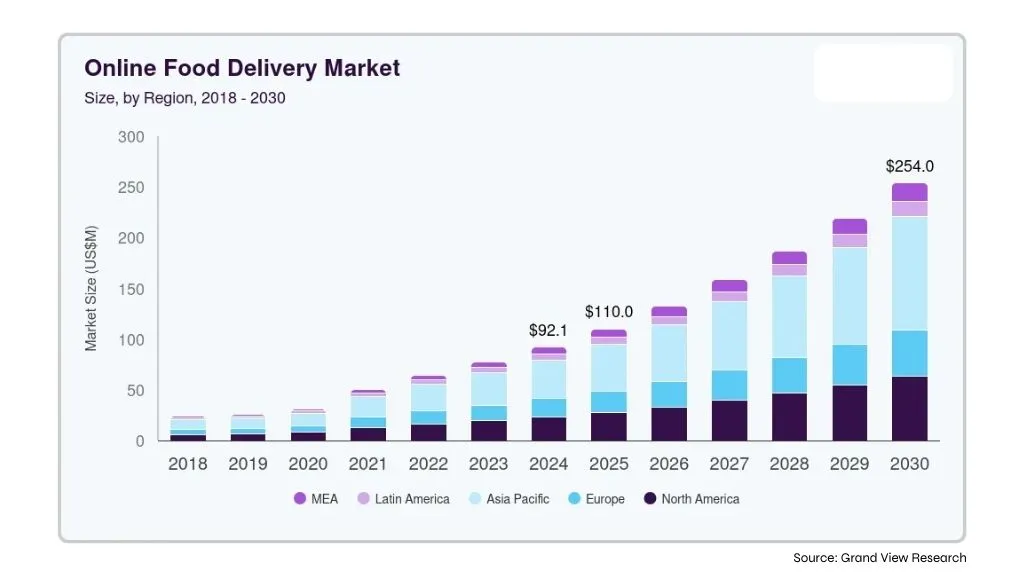
The market is moving in the same direction. Grand View Research estimates the global online food delivery market at $288.84B in 2024, projecting it to reach $505.50B by 2030 (9.4% CAGR). DoorDash also reported total orders up 32% YoY in Q4 2025, which is a useful signal that consumer ordering behavior is still trending digital.
This guide is for startups building an MVP and enterprises planning for scalability, integrations, and governance. Let’s learn what it truly takes to build a restaurant app that drives growth and operational clarity.
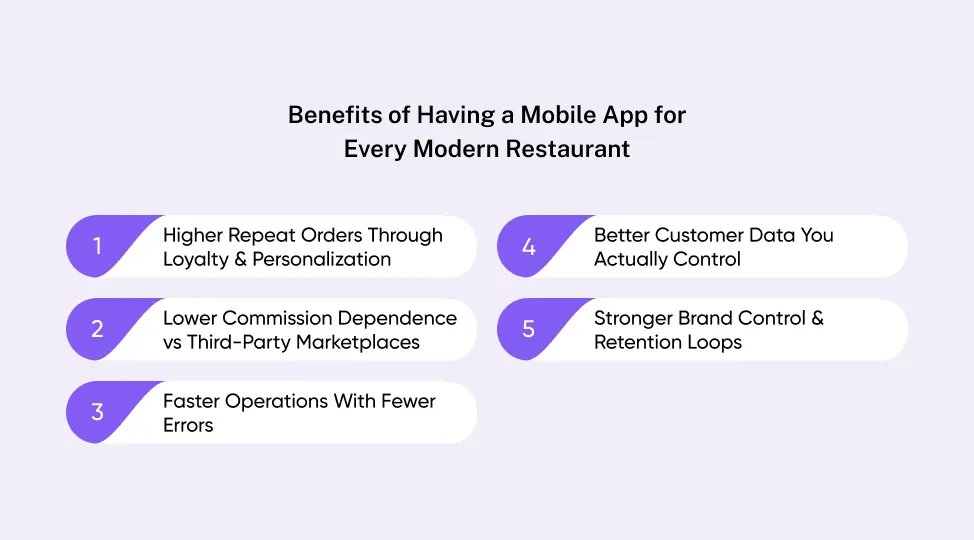
Benefits of Having a Mobile App for Every Modern Restaurant
A restaurant app is not just another ordering channel. If it’s done right, it becomes a direct growth loop that reduces friction for customers and reduces noise for operations. This is why choosing the right restaurant app development company matters as much as the feature set itself.
When you invest in restaurant app development, you’re buying control over the experience, i.e., how people discover your menu, how fast they can reorder, and how reliably your kitchen receives clean and accurate tickets.
1. Higher Repeat Orders Through Loyalty & Personalization
Loyalty programs are not magic, but they work when they remove effort. As per an analysis, it is found that restaurant loyalty members are more likely to return and spend more over time, especially when rewards feel immediate and relevant.
A strong loyalty layer inside custom restaurant app development supports repeat ordering, personalized offers, and “one-tap reorders” that keep customers from drifting to marketplaces.
2. Lower Commission Dependence vs Third-Party Marketplaces
Marketplaces are useful, but they’re expensive, and they own the customer relationship.
With direct ordering built into app development for restaurant brands, you can shift repeat customers to your app, keep margins healthier, and still keep marketplace presence for discovery.
3. Faster Operations With Fewer Errors
Phone orders introduce mistakes, especially during rush hours. A well-designed ordering flow captures modifiers, allergies, and delivery instructions cleanly.
That’s one of the fastest ROI moments in restaurant app development, with fewer remakes, fewer refunds, fewer angry calls.
4. Better Customer Data You Actually Control
A custom app gives you first-party behavioral data, like what people browse, where they abandon checkout, which items get reordered, and what promotions trigger repeat visits.
That data turns build restaurant app development from a one-time project into an optimization engine.
5. Stronger Brand Control & Retention Loops
Your app controls the UX, promotions, timing, and upsells. You can guide customers toward high-margin bundles, smart add-ons, and limited-time offers without being boxed into a marketplace template.
That control is the reason many teams choose custom restaurant app development over off-the-shelf solutions.
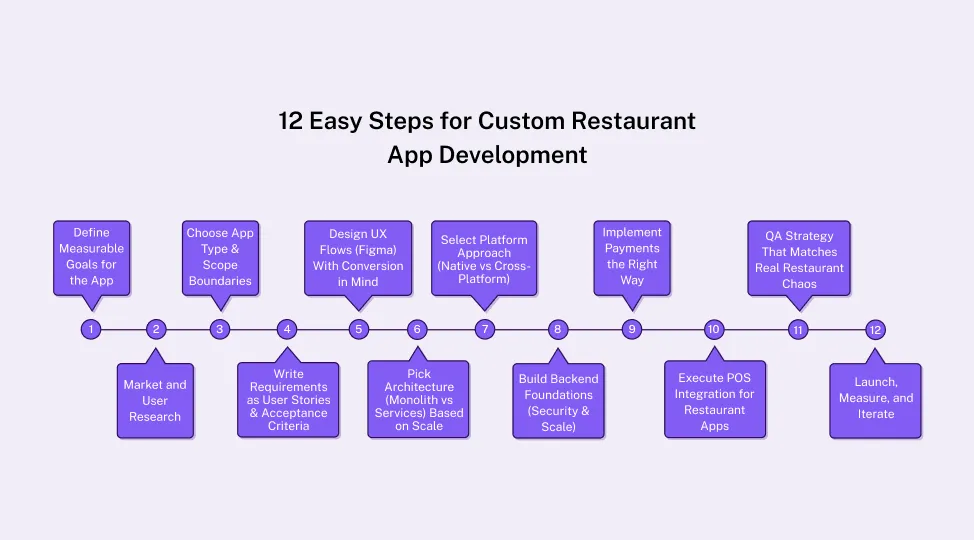
12 Easy Steps for Custom Restaurant App Development
A clean build is not about writing code faster, but about making the right decisions in the right order, so you don’t spend months fixing avoidable mistakes. Each step below sharpens the scope, minimizes operational risk, and ensures the restaurant app development reflects real kitchen workflows, actual customer behavior, especially POS integration for restaurant apps.
Step 1: Define Measurable Goals for the App
Start by deciding what success looks like in measurable terms. Features are easy to list and hard to validate. Outcomes force clarity and prevent bloated scope. In custom restaurant app development, outcomes also help you prioritize the integrations and workflows that truly move revenue and reduce operational friction.
Define 4 to 6 KPIs that map to growth and execution, such as:
-
Direct-order share (percentage of orders placed via your owned channels)
-
Repeat order rate (weekly or monthly reorders per customer)
-
Checkout conversion rate (menu view, cart, and payment completion)
-
Average prep time (confirmed and ready)
-
Support tickets per 100 orders (especially “where is my order” and refunds)
-
Order accuracy rate (remakes, incorrect modifiers, missing items)
Once KPIs are locked, translate them into a tight objective for the first release.
For example: “Increase direct pickup orders by 20% in 90 days while reducing phone-order errors.” That kind of target keeps restaurant app development grounded and makes every next decision easier, like UX, architecture, and POS integration.
Step 2: Market and User Research
Research does not need to take months, but it must be in-depth. This process needs to quickly reveal where money leaks out of the funnel and where operations break under load. In restaurant app development, the goal of research is to reduce guessing, because guessing gets expensive the moment you add payments, delivery, or POS integration for restaurant apps.
Start with two short tracks running in parallel:
1. Customer Reality Checks
-
Review recent feedback from Google, Yelp, and delivery platforms for patterns, like slow ordering, missing items, refund frustration, delivery ETAs, and menu confusion.
-
Run 8 to 12 short interviews (10 to 15 minutes each). Ask people to show how they place an order today and where they hesitate.
-
Map the ordering journey: discover menu, customize, checkout, track, then support. Note where drop-offs happen.
2. Staff And Operations Reality Checks
-
Talk to the manager, kitchen lead, and cashier. Ask what causes mistakes during rush hour, like modifier overload, out-of-stock items, unclear tickets, and late drivers.
-
Document “non-negotiables” like prep timing, cutoff rules, refund policies, and item substitutions.
-
Identify the systems you must connect: POS, delivery tools, inventory tracking, loyalty, SMS/email.
End this step with a simple output: a one-page list of top friction points and the 5 to 7 requirements that matter most.
For example: “Guest checkout is mandatory,” “Modifiers must be structured,” “Order status updates must be real-time,” “Menu must sync from POS daily.” That’s how app development for restaurant teams avoids building a pretty app that fails in production.
Step 3: Choose App Type & Scope Boundaries
Before you scope restaurant app development, you need to decide what kind of restaurant app you’re actually building, who it serves, and what systems it must connect to. That single decision shapes your architecture, cost, timeline, and the long-term success of the rollout.
1. Single-Restaurant Branded App (Direct Ordering & Loyalty): Single-restaurant branded apps are the best for independent restaurants or small groups focused on direct pickup and delivery. This model wins when speed matters and the goal is to increase repeat orders without marketplace fees.
2. Multi-Location Chain App (Location Routing, Centralized Admin, Analytics): Multi-location chain applications are built for brands where users choose a nearby store, then order from a menu that may vary by location. This is where custom restaurant app development becomes more complex because you need location rules, role-based access, and consistent reporting.
3. Delivery-First App (Routing & Delivery Partner Workflows): Delivery-first apps are useful when delivery is core, and you operate your own drivers. You’ll need driver onboarding, routing, proof of delivery, and exception handling when deliveries go sideways.
4. Reservation & Dine-In Experience App (Tables, Waitlist, QR Menu, Payments): Reservation and dine-in experience applications are specifically designed to reduce front-of-house pressure. Typical priorities include reservations, waitlist management, QR menu browsing, and possibly pay-at-table features.
5. Marketplace-Style Aggregator (Heavy Ops, Hardest To Scale): Marketplace-style aggregator applications are the “build a DoorDash” route. It’s operationally heavy, compliance-heavy, and requires deep supply-demand management. For most startups, it’s the wrong place to start.
💡 Suggested Read: Guide To Build A Custom Food Ordering App
Then define three scope layers:
1. MVP (What Must Exist To Create Value Immediately)
This is the smallest version of custom restaurant app development that can drive real orders. Typically:
2. V1 (What Improves Retention And Reduces Operational Load)
Add features that boost repeat usage and reduce support costs:
-
Loyalty and rewards
-
Saved favorites and one-tap reorder
-
Better notifications
-
Refund and support workflows
-
Analytics instrumentation
3. V2 (What Expands Into Optimization And Scale)
Only after the core loop is stable:
-
Personalization and recommendations
-
Multi-brand or franchise controls
-
Advanced dispatching (if delivery fleet exists)
-
Deeper CRM and marketing automation
Be strict about exclusions and make sure to write them down.
For example: “No table reservations in MVP,” “No delivery partner app in V1,” “No marketplace listings.” Most overruns in the restaurant mobile app development process happen because teams agree to vague “later” features that quietly become “now.”
Step 4: Write Requirements as User Stories & Acceptance Criteria
This is where your build becomes testable. Requirements written as vague feature lists (“add tracking,” “add loyalty”) create confusion, missed expectations, and expensive rework. For restaurant app development, you want requirements that describe behavior, edge cases, and the exact conditions under which something is considered “done.”
Start by converting scope into user stories for each role: customer, restaurant admin, and (if applicable) delivery partner. Then attach acceptance criteria so QA can validate outcomes without guessing.
Example User Story (Customer)
“As a customer, I want to reorder my last meal in two taps so I can check out quickly.”
Acceptance criteria:
-
The app displays “Reorder” for the last completed order within the last 60 days.
-
Reorder preserves modifiers and add-ons.
-
If an item is unavailable, the app prompts substitution or removal before checkout.
-
The user can complete payment without re-entering the address if previously saved.
-
The reorder flow completes in under 15 seconds on average network conditions.
Now do the same for operational workflows that often get ignored early and then cause chaos later:
Example User Story (Admin)
“As a manager, I want to pause online ordering during peak load so the kitchen doesn’t fall behind.”
Acceptance criteria:
-
Manager can pause ordering per location with a reason code.
-
Customer app clearly shows ordering is paused and suggests pickup time windows.
-
The pause event is logged for auditing.
-
Orders already confirmed continue processing without interruption.
Edge cases you must define upfront (non-negotiable):
-
Out-of-stock items and modifier conflicts
-
Store closed/holiday hours/cutoff times
-
Partial refunds, full refunds, and chargeback handling
-
Duplicate orders and payment failures
-
POS sync drift (menu mismatches) and fallback rules
This is also where you specify integration expectations. If POS integration is in scope, define what “integrated” means: menu sync frequency, order injection behavior, refund reconciliation, tax handling, and what happens when the POS is unavailable.
Step 5: Design UX Flows With Conversion in Mind
In restaurant apps, UX directly controls conversion, order accuracy, and repeat usage. A beautiful UI that adds one extra step to checkout can quietly destroy ROI.
Start with the core flows in Figma and keep them short:
-
Browse menu, customize, add to cart, checkout, payment, then tracking
-
Login is optional. Guest checkout must be a first-class path.
-
Reorder must be faster than ordering from scratch.
Design rules that consistently improve outcomes in app development for restaurant products:
-
Readable font sizes and contrast for menu items
-
Tap targets that work with one hand
-
Clear error messaging that tells users what to do next
-
Make customization structured, not free-form. Modifiers should be grouped (size, spice level, add-ons) with clear defaults.
-
Show pricing changes instantly. Users abandon carts when totals feel unpredictable.
-
Use clear delivery/pickup selection early. Don’t surprise the user at checkout.
-
Keep address and contact steps frictionless. Autofill, saved addresses, and validation prevent support issues later.
-
Design for speed on real devices. Menus must be readable, scrollable, and stable even on mid-range phones.
Step 6: Pick Architecture (Monolith vs Services) Based on Scale
Architecture in restaurant app development should match your stage and integration needs, not trends. For most startups, a modular monolith is the best default. It’s faster to build, easier to debug, and simpler to deploy while you’re still validating the core ordering loop.
For enterprise chains, a service-oriented setup can make sense when you need clear separation for orders, payments, loyalty, and notifications, especially as teams and locations scale.
Use these three signals to choose:
-
Traffic patterns: Lunch/dinner spikes require caching, queues, and observability either way.
-
Integration depth: Deep POS integration for restaurant apps needs a clean boundary for menu sync, order injection, and refunds.
-
Team maturity: Microservices add operational overhead; small teams usually slow down with them.
Regardless of approach, lock a clear order state machine, implement idempotency to prevent duplicate orders, and audit logs for disputes and refunds.
Step 7: Select Platform Approach (Native vs Cross-Platform)
Platform choice is a business decision disguised as a technical one. In restaurant app development, your priority is usually speed-to-market plus reliable performance during peak usage. That’s why many teams start with cross-platform and move to native only when the product proves traction or needs deeper device-level performance.
Go native (Swift/Kotlin) when:
-
You need top-tier performance for complex UI, heavy animations, or long sessions.
-
You want the best integration with Apple/Google ecosystems and device features.
-
You expect enterprise-level stability requirements and frequent OS-level changes.
Go cross-platform (React Native/Flutter) when:
-
You want one codebase for Android and iOS app development to ship faster.
-
Your UI is mostly standard screens, like menu, cart, checkout, tracking, and loyalty.
-
Your team needs rapid iteration during MVP and early growth.
Performance hotspots to watch in the restaurant mobile app development process:
-
Large menus with images and nested modifiers
-
Real-time tracking updates and push notifications
-
Checkout flows with multiple pricing rules and coupon logic
The practical approach is to decide based on release goals. If your V1 is focused on ordering, payments, and POS integration for restaurant apps, cross-platform can be efficient. If your product roadmap includes highly customized UI and rich interactions, native may be the better long-term bet.
Step 8: Build Backend Foundations (Security & Scale)
This is the part of restaurant app development users never see, but it determines whether the app survives real traffic. Your backend must handle authentication, pricing rules, order state updates, and integrations without creating duplicate orders or inconsistent tickets during peak hours.
Core backend foundations to implement early:
-
Authentication and roles: customer accounts, admin roles, and permission boundaries for staff actions
-
Secure data handling: encryption in transit, protected secrets, and safe storage for addresses and order history
-
Rate limiting and abuse controls: prevent bot-driven coupon abuse and request floods
-
Structured logging and monitoring: visibility into failed payments, failed order injections, and delivery exceptions
Define a clear order state machine and enforce it consistently, for example:
This prevents messy edge cases where the app shows “delivered,” but the kitchen never received the ticket.
Also, design the integration layer early, even if full rollout comes later. If POS integration for restaurant apps is part of the build, your backend needs reliable sync logic, reconciliation support, and fallback behavior when the POS is unavailable. That’s what keeps your menu, pricing, taxes, and order statuses consistent across systems.
Step 9: Implement Payments the Right Way (PCI-Safe Patterns)
Payments are where many restaurant apps quietly break trust. A slow checkout, failed charges, or messy refunds will cost you more than any UI issue. In restaurant app development, the safest approach is to follow PCI-compliant patterns and treat payments as a controlled workflow, not a simple “charge card” button.
Key implementation principles:
-
Use tokenization, not card storage: Card details should never touch your servers. Use a gateway flow (such as Stripe) where sensitive data is handled securely, and you store only tokens and transaction references.
-
Use payment intents or equivalent: This helps manage real-world scenarios like authentication steps, retries, and partial failures without double-charging customers.
-
Build refunds as a first-class feature: Support full and partial refunds, promo reversals, and clear status tracking so staff can resolve issues quickly.
-
Handle tips and fees consistently: Tips, taxes, delivery fees, and service charges must be transparent and correctly reconciled in the backend.
Also, design payment failure handling upfront:
-
If a charge fails, the order should not be “confirmed.”
-
If payment succeeds but order injection fails (often tied to POS integration for restaurant apps), the system must flag it immediately and trigger a recovery path.
When payments are implemented with these patterns, checkout becomes faster, disputes are reduced, and your team avoids the most dangerous category of bugs, which is “financial inconsistencies.”
Step 10: Execute POS Integration for Restaurant Apps
If your app does not stay aligned with the POS, it will eventually fall apart in production. Menus drift, prices mismatch, modifiers break, refunds become manual, and staff lose trust in the system. That’s why POS integration for restaurant apps is a core part of the restaurant mobile app development process when you want scale and operational reliability.
Start by choosing the right integration pattern:
Integration patterns
-
Direct POS APIs (best when available): More control, cleaner sync, fewer middle layers. You integrate directly with the POS provider’s API to pull menus and push orders.
-
Middleware/aggregators (faster, but adds dependency risk): Quicker to implement and supports multiple POS vendors, but you depend on the middleware’s uptime, data mapping, and limitations.
Then define what must sync and how often. At a minimum, restaurant app development should support:
Data Sync Rules (Minimum Set)
-
Menu and modifiers: categories, items, add-ons, required choices, combo logic
-
Pricing and taxes: location-specific pricing, service fees, tax rules
-
Inventory and availability signals: sold-out items, time-based availability (breakfast, lunch)
-
Order injection: confirmed orders sent into POS with full modifier detail
-
Refund and reconciliation support: refund reference IDs, order status matching across systems
Finally, design for failure. POS downtime and sync drift are not “rare.” They are guaranteed.
Failure Handling (Must-Have)
-
POS down: queue orders, retry with backoff, and alert staff before a backlog becomes chaos
-
Sync drift: schedule reconciliation jobs and keep audit logs of menu/pricing changes
-
Duplicate orders: enforce idempotency so retries do not create double tickets
-
Partial success cases: payment succeeded, but the POS injection failed, should trigger an immediate recovery workflow
If you get this step right, your restaurant app development stops being “a digital menu with checkout” and becomes a dependable ordering system that operations can trust.
Step 11: QA Strategy That Matches Real Restaurant Chaos
Testing a restaurant app like a normal consumer app is how you ship avoidable failures. Rush hour creates edge cases, like weak networks, overloaded kitchens, sold-out items, late drivers, and customers changing their minds mid-flow.
Types of testing you should include:
-
Device coverage: iOS versions, Android fragmentation, low-memory devices
-
Network conditions: slow 3G, dropped connections, timeouts during payment, and tracking
-
Peak-hour load: stress test ordering and notifications during lunch/dinner spikes
-
Menu chaos: modifier rules, required selections, pricing changes, item availability flips
-
System testing: validates the entire system works end-to-end across app, backend, admin, and integrations.
-
Integration testing: validates payments, notifications, maps, and POS integration for restaurant apps behave correctly under success and failure scenarios.
-
User acceptance testing (UAT): real restaurant staff validates workflows in a staging environment before launch.
-
Usability testing: checks whether customers can order quickly without confusion or extra taps.
-
Performance testing: measures app responsiveness, menu load time, and checkout latency.
-
Load testing: simulates peak-hour traffic spikes and verifies the system scales without timeouts or crashes.
-
Security testing: checks authentication, access control, input validation, and common vulnerabilities.
-
Network testing: validates behavior under poor connectivity, timeouts, and dropped sessions.
Step 12: Launch, Measure, and Iterate (Release Plan)
A launch is the first real test of your restaurant app development decisions under live conditions. The safest way to launch is to reduce blast radius, measure everything that matters, and iterate quickly based on real behavior, not assumptions.
Launch In Controlled Stages
Soft launch by location or region: start with 1 to 3 stores before rolling out chain-wide.
Limit the first release scope: keep the initial experience stable, as menu, ordering, payments, tracking, and core support flows.
Train staff and document workflows: most launch failures look like “app issues” but are actually process gaps.
Instrument Analytics From Day One
Track metrics that directly map to the ordering funnel and operational health:
-
Menu views to add-to-cart rate
-
Checkout conversion rate
-
Payment success rate and failure reasons
-
Average prep time and late-order frequency
-
Refund rate and top refund causes
-
Crash-free sessions and API error rates
Have A Clear Post-Launch Roadmap
Once the ordering loop is stable, expand in a sequence that protects operations:
-
Personalization: reorder prompts, favorites, and relevant offers
-
AI recommendations: only if you have clean data and clear guardrails
-
Loyalty optimization: tiered rewards, referral loops, time-based offers
-
Integration hardening: deeper POS integration for restaurant apps, reconciliation, and operational reporting
Core Features of a Modern Restaurant App Development
A strong restaurant app does not feel “feature-packed.” It feels “effortless.” The fastest way to design that kind of experience is to group features by user role, then build each role’s workflow end-to-end. This approach keeps restaurant app development structured, reduces scope creep, and makes it easier to test real-life scenarios before launch.
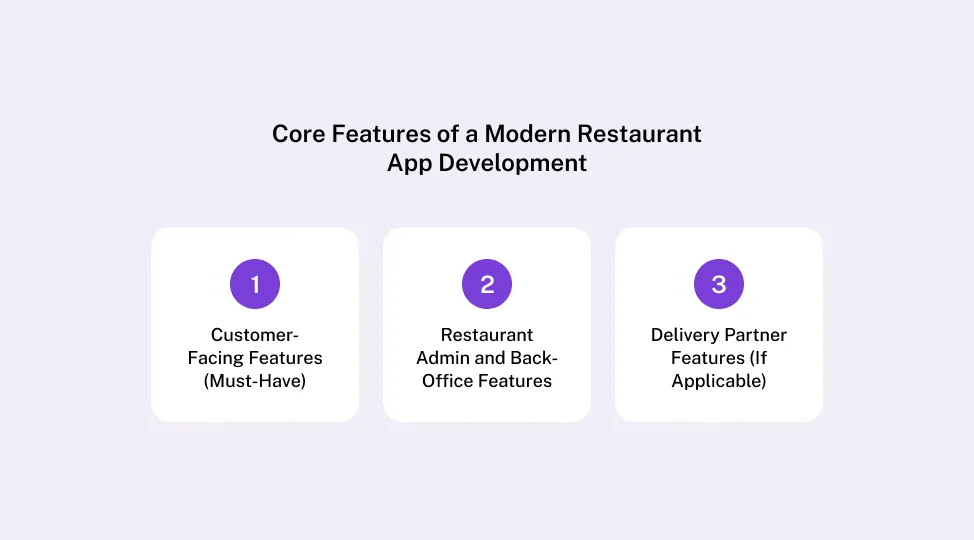
Here are the key features that must be integrated into a modern restaurant application:
1. Customer-Facing Features (Must-Have)
Customers judge the app in the first minute. If menu browsing is slow, checkout is confusing, or payments feel unsafe, they leave. Modern custom restaurant app development focuses on eliminating those micro-frictions while keeping the ordering flow short and predictable.
Account & guest checkout
Guest checkout reduces drop-offs. Accounts enable loyalty, reorders, and saved addresses.
Digital menu with modifiers, allergens, and nutrition
Modifiers are not a “nice feature.” They are the difference between correct tickets and refunds. Allergen visibility matters for trust and compliance.
Search, filters, favorites, and smart reorders
Search and category filters improve discovery. Favorites and reorders reduce time-to-checkout, especially for repeat customers.
Cart, coupons, tips, taxes, and fee transparency:
Pricing surprises kill conversions. Clear taxes, delivery fees, and tipping options reduce cart abandonment.
Secure payments (Apple Pay/Google Pay and Stripe/PayPal pattern)
Modern app development for restaurant brands should support fast wallets plus a reliable gateway pattern. Payments must be tokenized and PCI-safe.
Real-time order tracking, ETA, notifications
Tracking reduces “Where is my order?” support tickets. Push notifications keep the customer calm and informed.
Loyalty points, rewards, and referrals
Loyalty needs to be simple and visible. Rewards should feel attainable, not like a long-term math problem.
2. Restaurant Admin and Back-Office Features
If the customer app is the storefront, the admin panel is the engine room. Restaurants need speed, control, and clean visibility into order volume. This is where restaurant app development supports operations, not just marketing.
Menu and pricing management:
Add items, update modifiers, change pricing, and manage availability without developer involvement.
Order management dashboard:
Status controls, prep-time settings, throttling during peaks, and clear ticket visibility reduce chaos during rush.
Promotions and loyalty control:
Time-based offers, location-specific deals, and reward rules need to be configurable and auditable.
Customer support tools:
Refund rules, credits, partial refunds, and escalation workflows prevent inconsistent handling across staff.
Analytics (conversion, AOV, repeat rate, and churn):
These metrics tell you whether the app is driving revenue or merely shifting traffic.
3. Delivery Partner Features (If Applicable)
If you run your own delivery fleet, you need a delivery workflow that is simple and reliable. If you skip this, dispatch becomes manual, and support tickets spike. Delivery workflows also push the restaurant mobile app development process complexity up fast, so be deliberate.
Driver onboarding and availability:
Basic identity checks, shift scheduling, and availability toggles.
Route optimization and navigation
Efficient routing improves delivery times and reduces fuel costs.
Proof of delivery and issue reporting
Photos, notes, and exceptions (wrong address, customer unreachable) prevent disputes.
Why POS Integration is a Non-Negotiable Feature
At scale, the app is only as accurate as the system behind it. Without POS integration for restaurant apps, menus drift, prices mismatch, modifiers break, and order tickets get handled manually.
Integration is what keeps menu sync, taxes, inventory signals, order injection, refunds, and reconciliation consistent across locations. In practical terms, POS integration is the difference between a polished customer experience and a support nightmare.
Advanced Tech Stack For Custom Restaurant App Development
A modern restaurant app is not “just mobile screens.” It is a full system that connects ordering, payments, notifications, and operations into one reliable flow. The best restaurant app development stacks stay simple where they can, and scalable where they must.
The trending technologies to build a top-notch restaurant application are given below:
Frontend (Mobile)
-
iOS: Swift/SwiftUI for native performance and clean Apple ecosystem support
-
Android: Kotlin/Jetpack for flawless Android app development performance and better long-term maintainability
-
Cross-platform: React Native or Flutter when you want faster delivery with one shared codebase, especially for MVPs
Backend
-
Runtime: Node.js or Python (Django/FastAPI) for speed, mature ecosystems, and strong API support
-
APIs: REST for core flows; WebSockets for real-time order tracking and live status updates
-
Data layer: Postgres for transactional integrity; Redis for caching, queues, and rate limiting
Infrastructure
-
Cloud: AWS, GCP, or Azure, based on your existing org standards
-
Containers & CI/CD: repeatable builds, controlled releases, rollback capability
-
Observability: logs, metrics, and tracing so you can diagnose checkout failures, slow menus, or order injection issues
Integrations
-
Payments: Stripe/PayPal patterns with tokenization and clean refund support
-
Messaging: push notifications, SMS, and email for confirmations and status updates
-
POS integration for restaurant apps: direct POS APIs when possible, middleware when speed matters, plus audit logs and reconciliation jobs either way
Cost of Restaurant App Development
Cost is where vague plans get exposed. The cost of restaurant app development is not driven by “number of screens,” but by workflows (ordering, refunds, loyalty), reliability (testing, monitoring), and integrations, especially POS integration for restaurant apps. The best way to estimate cost is to map scope to complexity tiers and treat integrations as first-class work.
Cost Drivers of Restaurant App Development
The biggest levers in custom restaurant app development usually come down to:
-
Number of apps: customer app alone vs customer, admin, and driver apps
-
Menu complexity: modifiers, combos, time-based menus, allergen rules
-
Payment complexity: tips, refunds, split payments, promo reversals
-
POS integration for restaurant apps: vendor type, API maturity, sync + reconciliation depth
-
Real-time tracking and notifications: WebSockets, push, SMS, and edge cases
-
Security and compliance needs: role-based access, audit logs, penetration testing, privacy controls
💡 Suggested Read: How Much Does Mobile App Development Cost
Practical Cost Ranges of Restaurant App Development
These ranges assume a professional team, production-grade QA, and a stable backend. Location, team composition, and scope details can move numbers quickly, especially in restaurant app development with POS and multi-location needs.
| Build Scope |
Typical Fit |
What’s Included |
Typical Range (USD) |
| MVP (single location) |
Startups, single-brand restaurants |
Menu and modifiers, cart, checkout, payments, basic tracking, light admin |
$15k–$50k |
| Growth V1 (multi-location) |
Growing brands |
Multi-location routing, loyalty, reorder, analytics, stronger admin, deeper QA |
$30k–$150k |
| Enterprise (chain/multi-brand) |
Enterprise chains, franchises |
Role-based access, governance, advanced reporting, reliability engineering, and deeper integrations |
$40k–$300k+ |
If you need POS integration for restaurant apps (menu sync, taxes, order injection, refunds, reconciliation, drift handling), that alone can add meaningful cost depending on the POS vendor, middleware choice, and how “clean” the POS data is.
Estimated Timeline for Restaurant App Development
Building a custom restaurant app involves multiple phases, from initial planning to final launch. The timeline can vary based on the app’s complexity, but here’s a general overview to help you understand the estimated timeframes for each stage of the process.
Timeline Overview
Restaurant app development can range from a few months to half a year, depending on whether you're building a simple MVP or a more complex, feature-rich app.
Below is a typical timeline:
-
Define Outcomes & Set KPIs (1–2 Weeks): Begin by setting clear business outcomes and KPIs such as direct order share, reorder rate, and average prep time. This is crucial for tracking success.
-
Market & User Research (2–3 Weeks): Conduct thorough research by talking to staff and customers. Map out friction points in the ordering process and analyze competitors' strengths and weaknesses.
-
Choose App Type & Scope (1 Week): Decide whether you’re creating an MVP (Minimum Viable Product), a V1, or a fully developed app. This decision will impact the timeline significantly.
-
Write Requirements & Acceptance Criteria (2 Weeks): Document all features and user stories, including edge cases like out-of-stock items or closed stores. Ensure each requirement has acceptance criteria.
-
Design UX Flows (4–6 Weeks): Design the app’s user experience in tools like Figma. Make sure the ordering flow is smooth, accessible, and conversion-optimized.
-
Architecture Selection (2–3 Weeks): Choose the right architecture for your app. For startups, a modular monolith might be faster, while enterprise apps may benefit from a service-oriented architecture.
-
Platform Decision (Native vs. Cross-Platform) (1 Week): Decide between building for iOS, Android, or both. Consider cross-platform tools like React Native or Flutter for faster development.
-
Backend Setup (4–6 Weeks): Set up the backend, including database structures, user authentication, data encryption, and API integrations for order management and POS.
-
Implement Payment Systems (2–3 Weeks): Integrate secure, PCI-compliant payment systems (like Stripe, Apple Pay) and ensure the app handles transactions smoothly, including refunds and tips.
-
POS Integration (6–8 Weeks): Integrate the app with your POS system, ensuring seamless synchronization of menu items, pricing, inventory updates, and order management.
-
QA and Testing (4–6 Weeks): Thoroughly test the app across multiple devices, networks, and load conditions. This includes testing order flows, payment systems, and POS integrations.
-
Launch & Post-launch Optimization (2–4 Weeks): Begin with a soft launch in select locations to monitor app performance. Gather feedback, optimize, and prepare for a full-scale rollout.
Total Estimated Timeline:
Security, Privacy, and Compliance in Restaurant App Development
Security is not what you add at the end. When building a restaurant application, you handle personal data, order history, addresses, and payments, so trust becomes part of the product. Enterprises also need governance, like who can change menus, issue refunds, or access customer data, and how those actions are audited.
Key practices to include in custom restaurant app development:
-
Data minimization: Collect only what’s required for ordering, delivery, and support.
-
Encryption in transit: Use TLS for all client-to-server and service-to-service communication.
-
Encryption at rest (where appropriate): Protect sensitive fields like addresses and user identifiers.
-
Role-based access control (RBAC): Restrict admin actions (refunds, menu edits, promo overrides) by role.
-
Audit logs: Track menu changes, price edits, refunds, and critical operational actions with timestamps and user IDs.
-
PCI-safe payment handling: Use tokenization through gateways; never store raw card details on your servers.
-
Secure secrets management: Store API keys and credentials in a vault or managed secrets service.
-
Privacy alignment (GDPR/CCPA, where applicable): Support consent, retention rules, and deletion requests.
-
Incident readiness: Basic monitoring and alerting for unusual refund patterns, login anomalies, or failed order injection spikes.
When these controls are built into the restaurant mobile app development process early, you reduce both customer risk and enterprise compliance friction, without slowing delivery later.
Common Challenges in Restaurant App Development
Even well-designed apps can fail in production if they don’t account for restaurant reality, like peak-hour spikes, menu changes, staff workflows, and messy edge cases.
Here are the common challenges and practical fixes:
-
Menu complexity and modifier logic: Use a structured menu schema early. Enforce required modifiers, validate combinations, and keep pricing rules consistent across app and backend.
-
Peak-hour load spikes: Design for lunch/dinner bursts with caching, queues, and graceful degradation. If tracking is delayed, ordering should still work.
-
POS sync drift: Run reconciliation jobs, maintain audit logs, and define a source of truth. Strong POS integration for restaurant apps needs monitoring, not blind trust.
-
Refund disputes and chargebacks: Build traceable events: what was ordered, when it was confirmed, when it was delivered, and why it was refunded. Clear policies plus clean logs reduce disputes.
-
Delivery exceptions (wrong address, no-show, late driver): Add issue flows and support tooling. Customers need simple options: contact driver, report an issue, request help.
-
App abandonment and checkout drop-offs: Shorten ordering paths, offer guest checkout, reduce fee surprises, and make reorders frictionless with saved favorites and addresses.
The Final Takeaway
Strong restaurant app development is not about launching an app and hoping customers use it, but about building a direct ordering and retention system that stays reliable during peak hours and stays accurate across menus, pricing, and fulfillment.
When the app type is chosen correctly, the feature set is role-based, and the backend is designed for real-world failure handling, adoption becomes far easier.
The build process is straightforward when done in order, such as defining outcomes, validating user reality, locking scope, designing tight UX flows, choosing the right architecture, implementing secure payments, executing POS integration for restaurant apps, and testing like it’s rush hour, because it will be.
If you want a realistic estimate or a quick feasibility review of your scope, connect with a team that can evaluate UX, integrations, and delivery constraints before you write code.
Frequently Asked Questions
Q. How long does the restaurant mobile app development process take?
Ans. A lean MVP usually takes 8 to 14 weeks if the scope is limited to core ordering, checkout, payments, and basic admin features. A production-ready MVP with deeper QA, stronger backend architecture, and POS integration usually takes 16 to 20 weeks. Multi-location or enterprise restaurant apps typically take 24 to 32 weeks depending on integrations, workflow complexity, and testing requirements.
Q. What’s the difference between custom restaurant app development and using a template?
Ans. Templates are faster but limited. Custom restaurant app development gives you full control over UX, loyalty logic, analytics, and integrations. It also scales better when you need multi-location rules, roles, and operational tooling.
Q. What does POS integration for restaurant apps usually involve?
Ans. At minimum: menu and modifier sync, pricing and tax consistency, and order injection into the POS. More advanced setups include inventory signals, refund reconciliation, audit logs, and drift detection to prevent mismatches.
Q. Should we build native or cross-platform for app development for restaurant brands?
Ans. Cross-platform (React Native/Flutter) is often best for MVP speed. Native (Swift/Kotlin) can be better for long-term performance and deeper device integration. The right choice depends on roadmap complexity and performance needs.
Q. What features should we prioritize for an MVP?
Ans. Prioritize the core ordering loop: menu with modifiers, cart, checkout, secure payments, basic tracking, and essential admin controls. Add loyalty and personalization after ordering and support flows are stable.
Q. How do we reduce third-party delivery dependency without losing volume?
Ans. Keep marketplaces for discovery, but move repeat customers to direct ordering with better loyalty, smoother reorders, and consistent service. This is where restaurant app development pays off: you build a retention channel you own.
Tags
pp development for restaurant
mobile app development process
App Development


 Facebook
 Twitter
 LinkedIn
 Pinterest