Mobile apps rarely fail because teams skip testing. They fail because testing happens in environments that do not reflect how real users interact with the product.
A release may pass every staging check, meet deployment timelines, and still break when exposed to real devices, unstable networks, and live traffic. Login failures after an OS update, checkout errors during peak campaigns, or crashes on specific device models are common production issues that staging environments rarely capture.
For enterprises operating large scale digital products, these failures have immediate consequences. They impact revenue, customer trust, and brand reputation within minutes of deployment. As mobile ecosystems grow more complex with multiple OS versions, device manufacturers, and third party integrations, relying solely on pre release testing is no longer enough.
This is why modern engineering teams are adopting mobile app automation testing in real production environments. By validating critical user flows under real traffic conditions using controlled automation, feature flags, and real time monitoring, teams can detect issues earlier and release with greater confidence.
At Quokka Labs, we help enterprises integrate production aware automation into their mobile development lifecycle. The goal is simple: reduce release risk, validate real user behavior, and deliver reliable digital experiences at scale.
In this guide, we explore how automated mobile app testing in production environments works, why staging environments often miss critical failures, and how organizations can safely implement production ready automation strategies for high performing mobile apps.
What is Mobile App Automation Testing in Real Production Environments?
Mobile app automation testing in real production environments means running carefully controlled automated tests on a live application, while real users are actively using it. The objective is not to replace QA or staging automation, but to validate how critical workflows behave under the exact conditions users experience in the real world.
This approach focuses on testing critical user journeys, system integrations, and performance signals using real devices, real networks, and live backend services. When implemented correctly, automated mobile testing in production helps Android and iOS app development teams identify issues early, reduce release risk, and improve overall app reliability.
1. Production Automation vs Traditional Test Environments
Traditional test automation of mobile apps typically happens in isolated environments such as staging or QA. These environments use simulated data, limited device coverage, and predictable network conditions. While essential, they often miss edge cases that only appear in production.
Production automation differs in three key ways:
-
First, it interacts with real users rather than scripted test accounts alone.
-
Second, it runs on real devices instead of emulators or simulators.
-
Third, it validates live integrations and infrastructure behavior under actual traffic.
Test automation for mobile apps in production complements existing pipelines by adding a final layer of real-world validation.
2. Why Enterprises Are Testing Automation in Production
Enterprises adopt production automation to test scenarios that cannot be safely or accurately replicated elsewhere. These include real payment flows, third-party API reliability, network variability, and performance under peak traffic. User behavior in production is often unpredictable, and automation helps capture issues that scripted tests miss.
Importantly, this is not uncontrolled testing. Enterprises use a monitored and limited-scope strategy with feature flags, selective test cases, and rollback mechanisms. This ensures mobile app automation testing delivers real insights while minimizing risk to live users.
3. How Enterprises Roll Out Production Automation Without Breaking Trust
Most teams at reliable mobile app development services get production automation wrong because they start too big. They treat it like a full automation suite that belongs everywhere. In production, that approach creates unnecessary load, noisy results, and avoidable user impact.
Enterprises that succeed roll production automation out in stages, increasing scope only when safeguards and monitoring are already in place.
Start with small validation checks.
Run lightweight automated checks after deployment to confirm the app is stable and core services respond correctly. This is where teams catch obvious rollout failures early, without touching complex workflows.
Then validate one or two critical user journeys.
Once monitoring and rollback are proven, automation expands to high-impact paths like login, checkout, or payment confirmation. These tests should run through synthetic accounts or isolated test users, and only within controlled cohorts.
Use automation to protect rollouts, not just observe them.
At the next stage, production automation becomes part of the release process. If a critical flow fails or live signals degrade, teams pause the rollout or trigger rollback while the impact is still limited.
Finally, make it continuous where the risk is highest.
The most mature teams run production automation continuously during feature rollouts, peak traffic windows, and high-risk integrations. The scope stays small, but the signal stays constant.
The principle stays the same at every stage: production automation is not about testing everything in production. It is about validating what matters most, with real-time visibility and the ability to reverse fast.

Real Risks of Automated Mobile App Testing in Production (And How to Control Them)
Automated mobile app testing in production delivers real value precisely because it operates under real conditions. That same reality also introduces risk. The mistake most teams make is not acknowledging these risks early or assuming tooling alone will manage them.
Production automation fails when it is treated as a testing shortcut instead of a controlled engineering practice.
Key Risks of Mobile App Automation Testing in Production
-
User Impact: Automated actions may interrupt real user sessions or trigger unintended workflows.
-
Data Corruption: Tests interacting with live databases can alter or overwrite real user data.
-
Performance Degradation: Poorly timed or excessive test execution can increase load and slow down the app.
-
Compliance and Privacy Exposure: Automated tests may access sensitive data, creating GDPR, HIPAA, or PCI risks.
-
False Confidence: Limited or poorly scoped production tests may hide deeper system issues.
How Enterprises Control These Risks
-
Controlled Rollouts: Use feature flags and percentage-based exposure to limit test impact.
-
Isolated and Anonymized Test Data: Run tests using synthetic users and masked data to protect real customer information.
-
Strict Access and Execution Rules: Restrict when, where, and how automated mobile testing runs in production.
-
Real-Time Monitoring and Alerts: Combine APM, RUM, and crash analytics to detect issues immediately.
-
Small and High-Value Test Scope: Focus on critical paths like login, payments, and API dependencies rather than full regression.
When handled correctly, automated mobile testing in production becomes a controlled quality layer, not a liability. The goal is not to eliminate risk, but to reduce uncertainty while learning from real user behavior.
Best Practices for Mobile App Automation Testing in Production
This is where most teams either get production automation right or cause avoidable damage. Mobile app automation testing in live environments works only when it is intentional, limited, and observable. Enterprises that succeed treat production automation as a governance-driven practice, not an extension of pre-release QA.
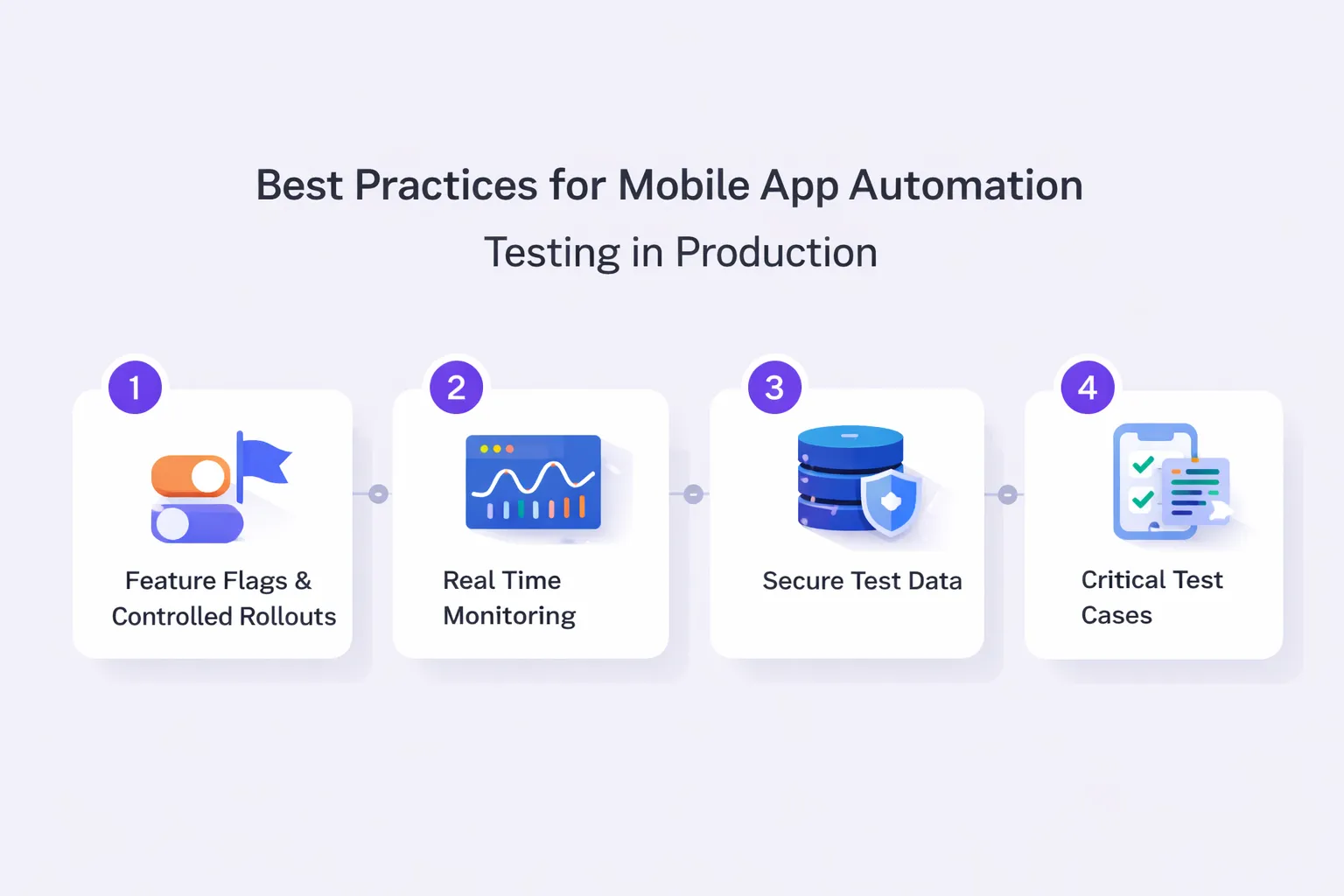
1. Feature Flags and Controlled Rollouts
Feature flags are the foundation of safe automated application testing in production. They allow teams to test functionality without exposing every user to risk.
Best practices include:
-
Canary releases to expose features to a small user cohort.
-
Percentage-based rollouts tied to regions, devices, or OS versions.
-
Immediate rollback without redeploying the app.
-
Separate flags for features and automated test execution.
By combining feature flags with test automation of mobile apps, teams validate real workflows while maintaining control over blast radius.
2. Real-Time Monitoring and Observability
Production automation without monitoring is guesswork. Every automated action must be observable in real time.
Enterprises rely on:
-
Application Performance Monitoring to track latency and failures.
-
Real User Monitoring to measure the actual experience impact.
-
Crash analytics to detect device-specific issues.
-
Error tracking tied to automation-triggered events.
Automated mobile testing becomes valuable only when test outcomes are correlated with live performance data, not just pass or fail logs.
3. Isolating and Securing Test Data
Data handling is the biggest blocker for production testing adoption. The solution is not avoidance, but isolation.
Control measures include:
-
Synthetic or sandboxed user accounts.
-
Anonymized and masked production-like data.
-
Read-only access where possible.
-
Strict audit logs for all automated actions.
These practices are critical for automated mobile app security testing, especially in fintech, healthcare, and regulated environments.
4. Small, Critical, High-Value Test Cases
Production is not the place for full regression suites. It is the place for validation of what truly matters.
High-impact test automation for mobile apps should focus on:
-
Login and authentication flows.
-
Payment and checkout journeys.
-
Core API dependency chains.
-
Session stability under real traffic.
By limiting scope, teams reduce risk while maximizing signal from automated testing in live conditions.
Real Devices vs Simulators in Production Automation
In real production environments, the choice between real devices and simulators directly impacts the reliability of mobile app automation testing. While simulators and emulators are useful during early development, they fail to replicate the conditions that cause most production issues.
-
Simulators operate in controlled environments with predictable hardware, stable networks, and limited OS-level constraints. They cannot accurately reproduce memory pressure, battery behavior, background process handling, sensor interactions, or manufacturer-specific OS customizations. This is why apps that pass automated testing on emulators often crash or degrade on real users’ devices.
-
Real devices expose automation to actual hardware limitations, network variability, OS fragmentation, and vendor-specific behaviors. This makes them essential for test automation of mobile apps in production scenarios.
Here’s a quick comparison table that improves skimmability and helps decision-makers understand the difference instantly:
| Aspect |
Real Devices |
Simulators/Emulators |
| Hardware behavior |
Actual CPU, memory, battery constraints |
Simulated, ideal conditions |
| Network conditions |
Real-world latency, drops, and throttling |
Stable, controlled networks |
| OS fragmentation |
Manufacturer-specific customizations |
Limited OS variations |
| Sensor support |
Real sensors (GPS, camera, biometrics) |
Partial or mocked support |
| Background processes |
Real multitasking and interruptions |
Predictable, simplified behavior |
| Production reliability |
High — mirrors real user experience |
Low for production validation |
| Suitability for production |
Essential |
Not recommended |
Best practices include the following:
-
Prioritizing devices based on real user analytics.
-
Focusing on the top OS versions and manufacturers.
-
Continuously updating the device matrix as usage shifts.
For production-grade automated testing, real devices are not optional. They are the only way to validate how your app behaves in the environments that matter most.
Tools and Frameworks for Production-Ready Mobile Automation
Choosing the right tools is critical when mobile app automation testing moves into real production environments. Production testing demands stability, observability, and precise control, not just test execution speed. The tools below support automated mobile app testing at enterprise scale when combined with strong rollout and monitoring strategies.
1. Automation Frameworks
Modern test automation of mobile apps relies on frameworks that support real devices and production-safe execution.
-
Appium: Best suited for cross-platform test automation for mobile apps. It supports Android and iOS using a single codebase and integrates well with CI/CD pipelines.
-
Espresso: Designed for Android, Espresso offers fast, reliable UI testing tightly coupled with the app lifecycle. It works best for internal production validations and critical user flows.
-
XCUITest: Apple’s native framework for iOS provides high stability and performance, making it ideal for automated testing in production on Apple devices.
Framework selection depends on platform coverage, execution speed, and integration needs.
2. Cloud Device Labs and Infrastructure
Cloud-based device labs enable automated testing on real devices without maintaining in-house infrastructure.
-
Access to diverse device and OS combinations.
-
On-demand scaling for peak testing windows.
-
Faster feedback loops for production releases.
Cloud labs work well for distributed teams and global apps. In-house devices make sense when compliance, data residency, or deep hardware control is required.
3. CI/CD Integration for Production Automation
Production automation must align with deployment workflows.
-
Trigger tests post-deployment.
-
Set production gates for critical failures.
-
Enable rollback triggers based on test and monitoring signals.
CI/CD integration ensures mobile app automation testing supports faster releases without compromising stability.
When Should You Use Mobile App Automation Testing in Production?
Mobile app automation testing in production is not for every application or release. It delivers the highest value when controlled testing is aligned with real business risk and user impact.
Production automation makes sense for:
-
High-traffic mobile apps where small issues affect thousands of users.
-
Fintech and e-commerce platforms with real payment, checkout, and transaction flows.
-
Apps with frequent releases and continuous feature rollouts.
-
Products with a global user base across devices, OS versions, and network conditions.
-
Business-critical workflows that cannot be fully validated in staging environments.
Automated mobile app testing in production should be avoided when:
-
Monitoring and rollback mechanisms are missing.
-
Test data cannot be isolated securely.
-
The app has low usage or infrequent updates.
Used selectively, production automation strengthens reliability without increasing risk.
5 Enterprise Use Cases: Where Production Automation Delivers ROI
Mobile app automation testing delivers measurable ROI when applied to high-impact, real-world enterprise scenarios where failures are expensive and hard to predict in staging.
Key enterprise use cases include the following:
-
E-commerce checkout validation where real payment gateways, discounts, and third-party APIs must work flawlessly under live traffic.
-
Fintech transaction flows require accuracy, security, and performance during peak usage hours.
-
Media and streaming apps where performance, buffering, and device-specific behavior affect user retention.
-
Healthcare applications that demand stability, compliance, and consistent performance across updates.
-
On-demand apps and mobility apps are experiencing traffic spikes during promotions, events, or surge pricing periods.
In these environments, automated testing in production helps teams detect failures early, validate critical paths continuously, and maintain user trust while scaling.

Common Mistakes Teams Make with Production Automation
Mobile app automation testing in production delivers value only when implemented with discipline. Many teams fail not because production testing is risky, but because it is applied incorrectly.
Here are the most common mistakes that teams make with production automation:
-
Running full regression suites in production, increasing user impact and system load.
-
Lack of rollback plans, leaving teams unable to respond quickly when issues appear.
-
Insufficient monitoring, which delays detection of performance or functional failures.
-
Ignoring security and data privacy, especially when handling real user information.
-
Over-testing low-impact features instead of focusing on critical business flows.
-
Testing without feature flags, which removes the ability to limit exposure or isolate failures.
-
Not segmenting users, causing test traffic to affect all users instead of controlled cohorts.
-
Assuming staging parity with production, leading to false confidence in test coverage.
-
Ignoring device and OS distribution data, resulting in poor test prioritization.
-
Treating production automation as a one-time setup, instead of a continuously refined process.
-
No clear ownership between QA, DevOp0s, and product teams, slowing response times.
-
Over-reliance on tools without process discipline, assuming automation alone guarantees safety.
Automated testing in production should remain targeted, monitored, and reversible. Avoiding these mistakes ensures testing improves reliability rather than introducing new risks.
Final Takeaway
Mobile applications today operate in highly dynamic environments shaped by device diversity, real user traffic, third party integrations, and continuous feature releases. In such ecosystems, relying solely on staging environments creates blind spots that often lead to production failures.
Mobile app automation testing in real production environments helps close that gap. When implemented with controlled rollouts, feature flags, real time monitoring, and tightly scoped test cases, production automation becomes a powerful validation layer that complements traditional QA processes. It enables teams to detect issues that only appear under real conditions while protecting the experience of live users.
For organizations building large scale digital products, this approach improves release confidence, reduces escaped defects, and strengthens overall mobile reliability. Instead of reacting to failures after users report them, engineering teams gain the ability to identify and address risks earlier in the deployment lifecycle.
At Quokka Labs, we work with enterprises and fast growing startups to design production safe mobile app automation testing strategies. By combining real device testing, intelligent rollout controls, and continuous monitoring, our teams help organizations validate critical user journeys while maintaining stability in live environments.
If your mobile application supports thousands of users across multiple devices and operating systems, production ready automation is no longer optional. It is an essential part of delivering scalable, high performing mobile experiences.
Frequently Asked Questions
Q. What is mobile app automation testing in production?
Ans. Mobile app automation testing in production refers to running controlled, automated tests on live applications using real devices, real traffic, and real backend systems. Unlike staging-only setups, this approach validates how the app behaves under actual user conditions while using safeguards like feature flags, monitoring, and rollback mechanisms.
Q. Is automated mobile app testing safe in live environments?
Ans. Yes, when done correctly. Automated testing in production is safe if tests are limited in scope, use anonymized or synthetic data, and are supported by real-time monitoring and instant rollback. Enterprises use it to complement, not replace, pre-release QA.
Q. Which tools are best for production mobile automation?
Ans. Popular tools for test automation of mobile apps include Appium for cross-platform coverage, Espresso for Android, and XCUITest for iOS. Cloud device labs like BrowserStack and Sauce Labs help teams test on real devices without maintaining in-house infrastructure.
Q. How do you protect user data during production testing?
Ans. Data protection relies on anonymized test data, isolated test accounts, access controls, and compliance checks. Automated mobile app security testing ensures that production automation does not expose sensitive user information or violate regulations like GDPR or HIPAA.
Q. When should enterprises avoid production automation?
Ans. Enterprises should avoid test automation for mobile apps in production when rollback systems are missing, monitoring is weak, or the application handles highly sensitive actions without proper isolation. Low-impact features and early-stage products are usually better tested outside production.


 Facebook
 Twitter
 LinkedIn
 Pinterest