Generative AI for product design is changing the way digital products come to life.
Imagine this. Your product team walks into a Monday workshop with a rough idea on a whiteboard. By the end of the day, you have a full set of screens, user flows, interaction notes, and a clickable prototype ready to show stakeholders. No late night Figma marathons. No days lost on first drafts.
This is the promise of generative AI for product design when it is used with a clear plan and the right tools.
Today, design is already shifting in this direction. A recent report notes that around 72% of organizations now use generative AI to optimize workflows, from prototyping to user testing. A new survey from a major design platform also found that 93% of designers in India already use AI tools in their daily work. [Source: The Economic Times]
The shift is real. But many teams still feel stuck with slow, manual design cycles.
We will walk through how you can move from idea to interactive prototype with less friction, step by step. We will keep the focus on practical flows, real use cases, and decisions you can make now.
What is Generative AI for Product Design?
At its core, generative AI is a set of models that can create new content from simple inputs or prompts. For design, that content might be:
- Screen layouts and UI ideas
- User flows and navigation structures
- Copy, microcopy, and error messages
- Simple interaction patterns and states
- Documentation and specs for handoff
When we talk about generative AI for product design, we mean using these models to support the full design journey, from first concept to high fidelity prototypes.
Traditional design flows looked like this:
- Stakeholders describe a vision in their own words.
- Designers translate that into rough sketches.
- Feedback cycles are long and mostly manual.
- Prototypes take days or weeks before anyone can click through.
With AI assisted design, the flow can look more like this:
- The team writes clear prompts about users, goals, and constraints.
- An AI system generates first pass flows and screen ideas in minutes.
- Designers pick, tweak, and refine what matters.
- A clickable prototype is ready early in the process.
The key point is simple. Generative ai in product design does not replace human judgment. It gives designers and product teams a faster starting point and a wider set of options to choose from.
How Generative AI in Product Design Fits into Modern Product Teams
Different roles use AI in different ways:
Product managers
-
Turn problem statements into user stories.
-
Explore feature variations and flows.
-
Summarize research into clear design inputs.
UX designers
-
Generate alternative user journeys.
-
Explore information architectures.
-
Draft wireframes and states faster.
UI designers
-
Explore visual directions and mood boards.
-
Generate layout ideas and grid options.
-
Adapt designs to different screen sizes.
Developers
-
Use prototypes as clearer specifications.
-
Generate sample data or placeholder content.
-
Get early interaction details before build.
Business owners and stakeholders
Across all these roles, generative ai design becomes a shared assistant that shortens the distance between “we think this might work” and “let us see how it feels in the product.”
Core Capabilities That Matter for Product Design
When you look past the hype, a few capabilities make the most difference:
Idea generation and exploration
Layout and UI suggestions
Different ways to place content on a screen.
- Responsive patterns across mobile and desktop.
Copy and microcopy generation
-
Button labels, empty states, and hints.
-
Consistent tone across flows and modules.
Flow and interaction suggestions
Simple prototyping and documentation
-
Quick clickable prototypes for user testing.
-
Generated notes, specs, and style summaries.
Why Now: Market Trends Driving Generative AI in Product Design
Shorter release cycles and higher user expectations
Products ship faster than ever. Releases are continuous, and users expect smooth, clean, and consistent interfaces on every device.
In that reality, slow design cycles become a real risk. If you spend weeks getting to a first prototype, competitors who use generative ai in product design can test more ideas, refine flows faster, and reach better product market fit sooner.
The shift to digital first experiences
For many companies, the digital experience is the brand.
-
Banks compete through apps, not branches.
-
Retailers compete through digital storefronts.
-
SaaS companies compete through product usability and speed.
Design quality is no longer just “nice to have.” It is part of how customers judge your promise. Generative ai design helps teams keep up with this pressure by reducing manual work while keeping designers in control.
AI tools move from experiments to daily workflows
AI in design is no longer a side experiment. Designers already use AI to:
-
Generate icons, illustrations, and visual assets.
-
Turn sketches into basic wireframes.
-
Suggest layout patterns based on content.
Product teams are also starting to see AI literacy as a core skill. Instead of a bonus, the ability to work with generative ai for product design becomes part of the job description.
Here is a quick view of common challenges and how AI helps.
| Challenge in design teams |
How generative ai design helps |
Impact on delivery time |
| Slow ideation and early drafts |
Instant variations from clear prompts |
Faster first concepts |
| Misalignment between stakeholders |
Shared AI generated flows and screen maps |
Clearer communication earlier |
| Manual documentation |
Auto generated notes and specs |
Less time on admin work |
With the bigger picture clear, we can break down how generative ai for product design supports each stage of the design process.
The End-to-End Product Design Flow with Generative AI – Ideas to Prototype
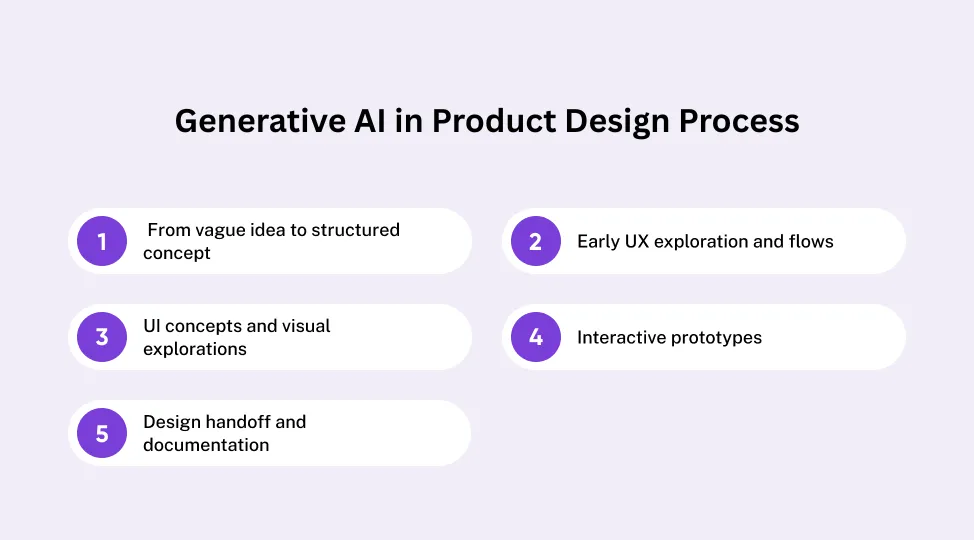
Stage 1: From vague idea to structured concept
Most projects start with loose ideas. AI can help turn that early mess into clarity.
-
Reframe a rough idea into clear problem statements and user goals.
-
Generate early user personas from basic demographic and behavior inputs.
-
Draft use cases and “day in the life” stories.
-
Highlight assumptions that need validation.
By doing this quickly, generative ai for product design gives teams a sharper brief before anyone opens a design tool.
Stage 2: Early UX exploration and flows
Once the concept is clear, AI can:
-
Suggest high level user journeys based on target outcomes.
-
Propose navigation structures and screen maps.
-
Offer alternative flows for key tasks like onboarding and checkout.
-
Help compare flows for friction points or complexity.
Designers still review and refine each flow. But the first draft comes together in hours instead of days.
Stage 3: UI concepts and visual explorations
Here, generative ai in product design supports visual thinking:
-
Generate mood ideas and visual directions based on adjectives and brand inputs.
-
Suggest layout grids and spacing systems.
-
Propose sets of components in line with your design system.
-
Offer multiple variants for hero sections, forms, or cards.
Designers can take the best ideas, adjust for nuance, and combine them with existing brand guidelines.
Stage 4: Interactive prototypes
This is where ideas become something people can click.
-
Turn AI assisted wireframes into clickable prototypes inside common tools.
-
Add simple transitions and micro interactions based on best practices.
-
Connect screens to sample data for more realistic demos.
-
Prepare variations for different user segments.
For stakeholders, this is the moment where generative ai for product design feels real. They can click through flows and give concrete feedback early.
Stage 5: Design handoff and documentation
Handoff is often where projects slow down. AI can:
-
Generate specs for spacing, typography, and components.
-
Produce style summaries that match your system.
-
Turn flows into user stories or acceptance criteria.
-
Create checklists for developers and QA teams.
The result is a smoother bridge between design and engineering, with fewer questions and less rework.

Cost, Effort, and ROI: Making Sense of Generative AI Design Investments
What shapes generative AI development cost
The total investment depends on a few practical factors:
Data sources you want to use
- Internal design files, research notes, analytics, and more.
Number of tools and workflows to integrate
- Design suite, project management tools, repositories, and analytics.
Type of models
Security and compliance needs
For a deeper planning view, teams often start with a clear breakdown of their generative AI development cost before they move beyond pilots.
Time and effort to reach first working prototypes
A typical path might look like:
-
Two to four weeks for discovery and opportunity mapping.
-
Two to six weeks to build a focused pilot around one product or feature.
-
A few more weeks to integrate results into regular design work.
Quokka Labs helps shorten this path by bringing design, engineering, and AI skills together. Instead of several disconnected vendors, you work with one team that understands full digital product life cycles.
How to calculate ROI for generative ai for product design
You can keep the math simple and visible.
Common metrics:
-
Time to first clickable prototype.
-
Number of concepts explored per design cycle.
-
Number of iteration loops before stakeholder approval.
-
Time between stakeholder feedback and updated prototype.
Choosing the Right Generative AI Implementation Strategy for Product Teams
Map your goals and use cases
Start by focusing on impact, not tools.
-
List your current design and product pain points.
-
Rank them by business value and user impact.
-
Decide where generative ai for product design can help most.
Good starting points include:
Pick tools and models that match your stack
Then look at what fits your environment.
-
Design tools your team already uses.
-
Product and engineering platforms within your existing tech stack.
-
Data and security policies.
Balance:
-
Built in AI features in tools you know.
-
External platforms that allow more customization.
-
Any internal models your company already uses.
Design a step-by-step rollout
Avoid big bang launches.
-
Start with one team or one product.
-
Use a small number of clear use cases.
-
Collect feedback and adjust prompts and flows.
-
Document patterns and learnings.
For long term success, teams need a simple and clear Generative AI Implementation Strategy that guides pilots, scaling, and governance.
Governance, security, and review loops
From the start, set rules around:
-
What data is allowed in prompts.
-
Who can access which tools and models.
-
How outputs are reviewed, especially before going to users.
This ensures that generative ai in product design stays safe and aligned with your organization's standards.
If you have a clear strategy, the next question is whether to build alone or partner with a team that has walked this path before.
Common Pitfalls and How to Avoid Them
Treating AI outputs as final design
AI can draft. It cannot replace human judgment.
-
Always review AI generated screens and flows.
-
Ask if they match user needs, brand voice, and product strategy.
-
Use AI as a first draft, not as final delivery.
Ignoring data and privacy considerations
Be careful with what you share.
-
Do not paste sensitive or personal data into prompts.
-
Use approved datasets where needed.
-
Work with security teams to define safe usage rules.
Overcomplicating the first rollout
Teams sometimes try to use every AI tool at once.
Not aligning design and engineering
Good design prototypes still need solid implementation.
-
Bring engineers into AI assisted design discussions early.
-
Ensure AI generated documentation and flows work for development.
-
Use AI to support both design and engineering, not just one side.
Once these risks are managed, teams can focus on the future and where generative ai in product design is heading next.
Final Snippets: Turn Your Next Product Idea into a Clickable Prototype
Generative ai for product design shortens the distance between concept and reality.
Used well, it helps teams:
-
Turn vague ideas into structured product concepts.
-
Explore more design options without burning out designers.
-
Build interactive prototypes much earlier in the process.
-
Reduce rework and improve communication with engineering and stakeholders.
At Quokka Labs, we combine product strategy, design depth, and generative AI development services to help you move from vision to working digital products with less friction.
If you have a product idea, a feature in mind, or a design process that feels too slow, now is the right time to explore what AI can do for you. Share your next product idea with Quokka Labs and see how quickly it can become an interactive prototype. Contact us today!


 Facebook
 Twitter
 LinkedIn
 Pinterest