Want to launch on iOS and Android without building everything twice? That is why so many teams are learning mobile app development with React Native today.
It cuts duplicate effort, speeds up delivery, and helps businesses control cost without giving up app quality. The market opportunity is huge too.
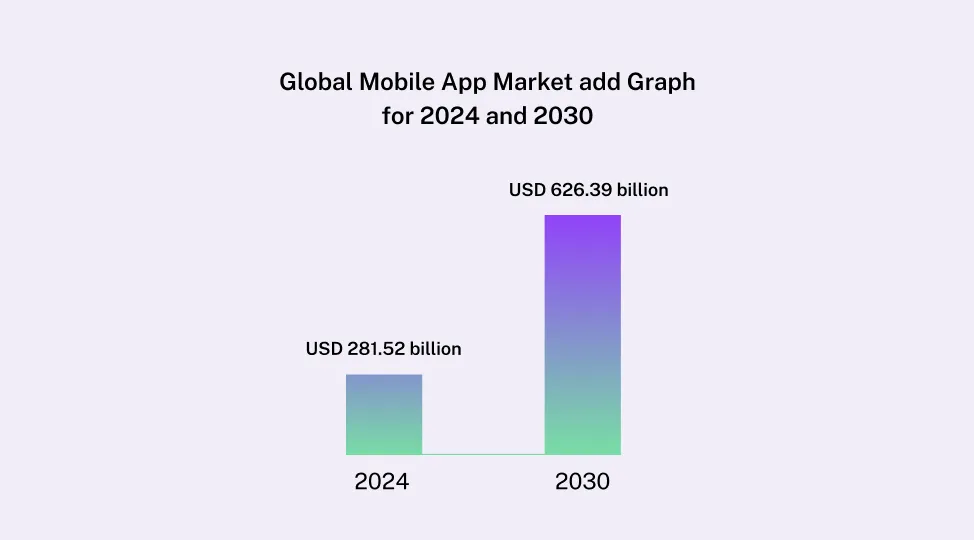
The global mobile app market was valued at USD 281.52 billion in 2024 and is projected to reach USD 626.39 billion by 2030. For startups, SMEs, and enterprises, picking react native for mobile app development is now a practical choice for faster launches, cleaner roadmaps, and smarter scaling.
This guide covers planning, stack selection, delivery, testing, comparison, and react native app development cost in a way decision-makers can use.

Why Choose React Native for Mobile App Development
React Native is a framework for building native apps for iOS and Android using React. It lets teams reuse a large part of the codebase across platforms while still delivering a native app experience. The official documentation positions it as a framework for building native apps using React, and the platform now supports production-ready development workflows through recommended frameworks and tooling.
That is why react native for mobile app development keeps getting attention from product teams.
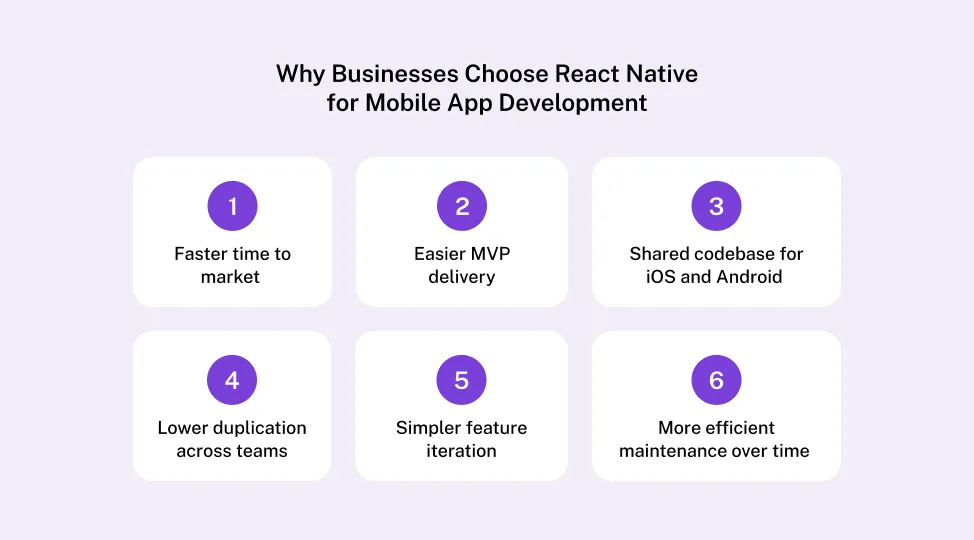
Businesses usually choose it for a few simple reasons:
-
faster time to market
-
shared codebase for iOS and Android
-
easier MVP delivery
-
lower duplication across teams
-
simpler feature iteration
-
more efficient maintenance over time
It works especially well for customer-facing apps, internal business apps, ecommerce flows, healthcare platforms, logistics dashboards, and service apps. If you are planning a Cross-Platform App with React Native, the framework gives you a strong balance between speed and flexibility.
Still, React Native is not the perfect answer for every case. If your product depends heavily on graphics-intensive gaming, deep hardware control, or platform-specific rendering at the highest level, native development may still be the better fit.
In simple terms, React Native is best for businesses that want faster delivery and broader platform to reach without building everything twice.
Suggested Read: React Native Statistics 2026
If you want to evaluate deeper, explore our detailed guide on Why Choose React Native for Mobile App Development.
Let’s move from the why to the actual build path.
If you are new to the ecosystem and unsure how React differs from React Native, it is worth understanding their core differences before moving forward.
Step 1. Define The Business Goal Before You Build an App with React Native
The first real step is not choosing a library. It is defining the business problem.
Before you Build an App with React Native, answer four questions:
-
What problem does the app solve
-
Who will use it
-
What core action should users complete
-
How will success be measured
This matters because startups, SMEs, and enterprises have different priorities. Startups need validation and speed. SMEs usually care about operational efficiency, retention, and ROI. Enterprises care about scale, integrations, governance, and long-term support.
You should also define the app type early.
| App Type |
Best For |
React Native Fit |
| MVP |
Startups testing demand |
Excellent |
| Customer App |
Commerce and service brands |
Strong |
| Internal App |
SMEs and enterprises |
Strong |
| Highly Native App |
Deep hardware or platform control |
Case by case |
Then list only the core features. That usually means login, profile, dashboard, notifications, payment flow, analytics, admin controls, and needed integrations. The goal here is not to build everything. The goal is to build the part that proves value.
A lot of teams skip this and jump into code. That usually leads to rework, scope confusion, and wasted budget. If you want a reliable start, define outcomes first, then features second. That also makes future conversations with a React Native app development company much easier, because your scope is tied to business value, not guesses.
Step 2. Plan Features, User Flows, And Scope
Once the goal is clear, the next job is to convert ideas into a realistic product scope.
Start with user stories. Keep them plain and useful:
-
As a buyer, I want to browse and pay quickly
-
As a patient, I want to book an appointment without calling
-
As an employee, I want to submit requests from my phone
Then map the user flows. At minimum, define the path from onboarding to the main action. That could be sign-up to dashboard, search to purchase, or booking to confirmation. Good scope planning also covers support flows, notification-driven return flows, and failure states.
Now separate must-have features from later-phase features. This one decision has a direct impact on react native app development cost.
Must-have features belong in version one. Nice-to-have features can wait. That includes advanced analytics, loyalty engines, deep personalization, or multi-region admin controls unless they are core to launch.
Wireframes help here more than many teams expect. They reduce confusion, expose UX gaps, and improve estimates before development begins. Even simple low-fidelity wireframes can save weeks.
This is one of the smartest places to protect budget. A clear scope reduces change requests, keeps developers aligned, and helps product owners make faster calls during sprints.
So yes, planning feels slower at the start. But it makes delivery much faster later.
Step 3. Set Up the Right React Native Tech Stack
Good execution depends on the right stack. That does not mean the biggest stack. It means a stack that matches the app.
At the core, mobile app development with react usually includes React Native, JavaScript or TypeScript, navigation tools, state management, API handling, local storage, analytics, and testing utilities. The React Native docs also point developers toward framework-based setups for production-ready apps, not just bare configuration from scratch.
One early choice is Expo vs React Native CLI.
| Option |
Best For |
Pros |
Limits |
| Expo |
MVPs and fast delivery |
Quicker setup, easier tooling |
Less native flexibility in some cases |
| React Native CLI |
Custom native requirements |
Fuller control |
More setup and maintenance |
Backend choices depend on the business case. Common options include Node.js, Firebase, Supabase, Django, .NET, or an existing enterprise backend. If the app already depends on legacy systems, plan those connections early.
You should also decide on third-party services upfront:
-
analytics
-
crash reporting
-
push notifications
-
payments
-
authentication
-
maps
-
CMS tools
This is also where the react native software development process becomes more technical. Architecture matters. React Native’s newer architecture was redesigned to improve how JavaScript and native layers work together, and official guidance says it has already been proven at scale in production.
If you are still evaluating frameworks before committing, you can explore a detailed comparison of Flutter vs React Native vs Kotlin to understand trade-offs across performance, flexibility, and development speed.
If your app handles sensitive data, build security into the stack from day one. Plan encrypted storage, secure API communication, access roles, logging, and policy requirements early.
Suggested Read: React Native App Security
Step 4. Follow A Step-By-Step React Native Software Development Process
Here is the clearest answer to the main question.
To build a mobile app using React Native, follow these steps:
-
define the business goal
-
finalize the MVP scope
-
create wireframes and user flows
-
choose the stack and architecture
-
set up the project
-
build the frontend
-
connect the backend and integrations
-
test on real devices
-
release beta builds
-
publish to app stores
-
maintain and improve the product
That is the full react native software development process in practical form.
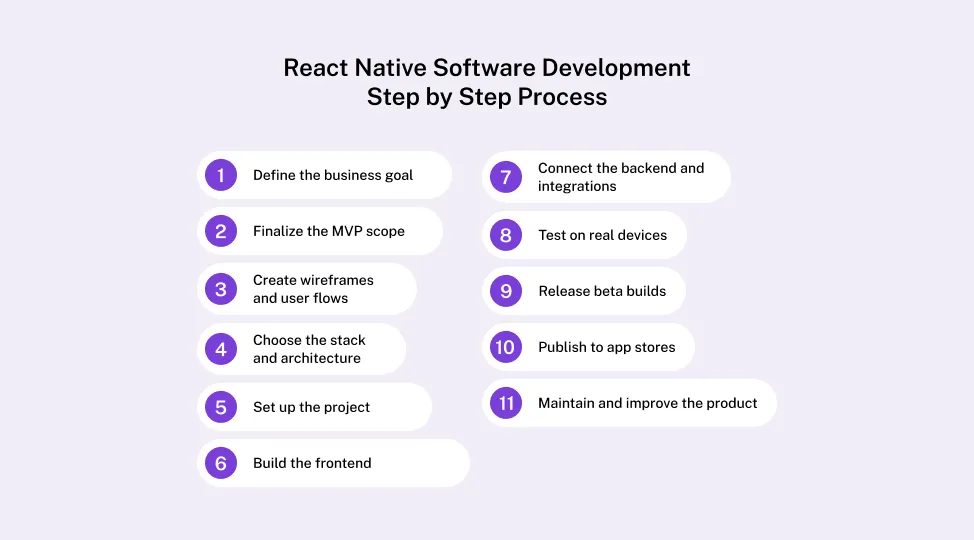
Each step has a clear purpose. Discovery defines scope. Design improves usability. Development builds the actual workflows. Testing removes product risk. Launch gets the app into users’ hands. Maintenance keeps the app useful as devices, OS versions, and customer needs change.
The team structure should match the company stage.
For startups, a lean team is often enough:
-
product lead
-
designer
-
one or two developers
-
QA support
For SMEs:
-
product manager
-
[UI UX designe)
-
React Native developer
-
backend developer
-
QA engineer
For enterprises:
A sprint-based delivery model works well for most teams because it allows fast review cycles and controlled changes. It also helps leadership track progress without waiting until the very end.
Typical delivery windows often look like this:
| App Scope |
Estimated Timeline |
| MVP |
8 to 12 weeks |
| Mid-level business app |
3 to 5 months |
| Enterprise app |
6 months or more |
Those ranges are not fixed quotes. They shift based on complexity, team size, integrations, design depth, and approval workflows.
If you want a more technical companion piece, topics like React Native Performance Optimization are useful once your build enters heavier feature work.
Step 5. Build The Frontend, Backend, And Integrations
This is the stage where product plans become real app behavior.
On the frontend side, focus on reusable components, responsive layouts, clean navigation, accessibility basics, and platform-aware styling. React Native uses native components rather than web components, so teams coming from web React should plan for that difference early.
On the backend side, connect the app to authentication, databases, file storage, user roles, and business logic. This is where react native for mobile app development becomes more than a UI decision. The app has to work reliably across sessions, devices, and network conditions.
Essential integrations usually include:
If you are building retail features, a resource like react native for Ecommerce App becomes especially relevant because ecommerce flows bring higher expectations around browsing speed, checkout reliability, and retention mechanics.
You should also plan offline behavior. Add caching where needed, optimize images, reduce slow network dependence, and improve loading states. For enterprise teams, SSO, permission control, and secure data exchange often matter just as much as the visible UI.
At this stage, mobile app development with react only works well when frontend, backend, and integrations are treated as one system, not three separate tasks.
Step 6. Test, Debug, And Optimize for Real Users
A React Native app that looks good in staging can still fail in the real world. That is why testing needs to go beyond emulators.
Run these test types:
-
functional testing
-
UI testing
-
API testing
-
device testing
-
performance testing
-
security testing
-
regression testing
Real-device testing matters because actual users bring different screen sizes, OS versions, memory limits, and unstable networks. The official docs also highlight that React Native apps often interact with native layers and third-party libraries, which makes device-level behavior important.
Common issues to catch early include navigation glitches, inconsistent layouts, slow rendering, push notification failures, dependency conflicts, and platform-specific edge cases. Also don't forget about React Native Authentication.
To improve performance:
-
reduce unnecessary rerenders
-
optimize large assets
-
trim heavy screens
-
improve API request handling
-
monitor crash and latency signals
Step 7. Launch And Maintain Your React Native App
Launch is important, but it is not the finish line.
Before release, make sure you have:
Then pick a release model. A soft launch, beta release, or phased rollout often works better than a full public launch on day one. It reduces risk and gives the team room to fix early issues fast.
After launch, plan for:
-
bug fixes
-
OS compatibility updates
-
feature improvements
-
analytics reviews
-
conversion improvements
-
security patches
React Native continues to evolve, and the official project keeps updating docs, tooling, and architecture guidance. That is another reason maintenance should be budgeted from the beginning, not treated as an afterthought.
React Native App Development Cost Breakdown
Now, to the question every stakeholder asks.
React Native app development cost depends on scope, design depth, integrations, security requirements, testing effort, and long-term maintenance.
The biggest cost drivers are usually:
-
app complexity
-
number of screens
-
custom UI
-
backend requirements
-
third-party integrations
-
admin panel scope
-
security and compliance
-
QA coverage
-
release management
-
maintenance plans
Here is a broad market-style estimate:
| Project Type |
Estimated Cost Range |
| Basic MVP |
USD 15,000 to 35,000 |
| Mid-level App |
USD 35,000 to 80,000 |
| Complex Business App |
USD 80,000 to 150,000+ |
| Enterprise App |
USD 150,000+ |
These are directional estimates, not fixed quotes. A simple app with stable APIs can be much cheaper than a smaller-looking app with payments, compliance, offline sync, and multiple user roles.
Hidden costs usually show up in analytics setup, QA cycles, store compliance work, scaling backend services, and later integrations.
Refer to React Native App Development Cost guide if you want product scope first, not hourly rates first.
The best way to control budget is simple:

Common Mistakes to Avoid When You Build an App with React Native
The biggest mistake is assuming cross-platform means easy.
Other common mistakes include:
-
starting without clear scope
-
overbuilding version one
-
weak state management
-
poor project structure
-
choosing libraries too casually
-
delaying performance work
-
testing too late
-
ignoring analytics
-
underestimating maintenance
Cross-platform development is not about avoiding trade-offs. It is about making smarter trade-offs. React Native works best when teams stay disciplined about scope, architecture, and release quality.
Final Thoughts
If you want the honest answer, how to build mobile apps using React Native comes down to one thing: build with discipline, not just speed.
React Native is a practical choice for startups, SMEs, and enterprises because it helps teams launch faster, manage one broader codebase, and keep product delivery more efficient. But results still depend on planning, UX quality, technical architecture, testing depth, and post-launch support.
So, start with the problem. Define the MVP. Choose the right stack. Follow a clean process. Test on real devices. Budget for maintenance.
That is how you build a React Native app that is not only faster to launch, but actually worth keeping.

FAQs About Mobile App Development with React
Is React Native Good for Mobile App Development?
Yes. React Native is a strong choice for many business apps because it helps teams launch faster on both iOS and Android with a shared codebase.
Why businesses choose it:
-
faster development cycles
-
lower duplication across platforms
-
easier maintenance
-
good fit for MVPs and scalable business apps
It works especially well for startups, SMEs, and enterprises that want speed, flexibility, and a reliable app experience without building two separate products from scratch.
How Long Does It Take to Build a React Native App?
The timeline depends on app size, features, integrations, and testing needs.
Typical timelines:
A simple app with limited screens will move faster. An app with custom workflows, third-party integrations, admin panels, and compliance needs will take longer.
What is the Average React Native App Development Cost?
The average react native app development cost usually starts at around USD 15,000 for a simple MVP and can go beyond USD 150,000 for a complex or enterprise-grade product.
Cost usually depends on:
-
app complexity
-
number of screens
-
custom design
-
backend development
-
integrations
-
testing scope
-
maintenance needs
The more advanced the app, the higher the total cost.
Is React Native Better Than Native Development?
It depends on the product goals.
React Native is often better for:
Native development is often better for:
-
heavy graphics processing
-
deep hardware access
-
platform-specific features
-
advanced performance use cases
React Native is usually the smarter choice when speed, budget, and shared development matter most.
Can Enterprises Use React Native?
Yes. Enterprises can use React Native for customer apps, internal tools, field-service platforms, employee apps, and digital transformation projects.
Why enterprises use it:
-
shared codebase across platforms
-
faster release cycles
-
easier product updates
-
support for backend integrations
-
suitable for internal and external use cases
It is a practical choice when the business needs scale, consistency, and faster app delivery.
What is the Best React Native Software Development Process?
The best react native software development process is structured, lean, and focused on business outcomes.
A proven process includes:
-
discovery and requirement gathering
-
feature planning and scope definition
-
wireframing and UX design
-
tech stack and architecture setup
-
frontend and backend development
-
testing on real devices
-
launch and post-launch support
This process helps reduce rework, control cost, and improve launch quality.
Also read: Angular vs React: Which Front-End Framework is Better in 2026?
Is React Native Good for Startups?
Yes. React Native is one of the best options for startups that want to validate an idea quickly and launch on both platforms without doubling development effort.
Startup benefits include:
For early-stage products, React Native helps founders move from idea to launch much faster.
Can React Native Be Used for Enterprise Apps?
Yes. React Native can support enterprise-grade apps when the architecture, security, and integrations are planned properly.
It is commonly used for:
It works best when paired with a strong backend, secure APIs, and clear product requirements.
Is React Native Good for Ecommerce App Development?
Yes. React Native is a strong fit for ecommerce apps because it supports fast browsing, smooth navigation, push notifications, and shared development for iOS and Android.
It is useful for ecommerce features like:
It helps brands launch faster and manage updates more efficiently across both platforms.
What Are the Main Benefits of Mobile App Development with React?
The biggest advantage of mobile app development with react is development efficiency without sacrificing business value.
Main benefits include:
That makes it a smart choice for businesses that want growth and cost control together.
What Factors Affect React Native App Development Cost?
Several factors directly affect react native app development cost, and each one changes the final budget.
Main cost factors are:
A simple MVP will cost much less than a feature-rich app with enterprise-level requirements.
Does React Native Support Both iOS And Android?
Yes. React Native is designed to support both iOS and Android from a shared codebase.
That means businesses can:
This is one of the main reasons react native for mobile app development remains popular among startups, SMEs, and enterprises.
Is React Native Future-Proof For Long-Term App Development?
React Native is a strong long-term option for many business apps because it continues to evolve and remains widely adopted for cross-platform product development.
It is especially future-ready for teams that need:
-
regular feature updates
-
scalable app architecture
-
faster cross-platform releases
-
long-term maintenance efficiency
The right architecture and development process matter more than the framework alone, but React Native remains a solid long-term choice for many products.


 Facebook
 Twitter
 LinkedIn
 Pinterest