Most teams have tried a ChatGPT-style tool by now. A few people love it. Most leaders still ask a simple question: “Where is the real business impact?”
Research from MIT shows that nearly 95% of enterprise generative AI initiatives fail to produce measurable P&L impact. The reason is not model quality. It is weak integration into real workflows, poor data readiness, and no clear ownership after launch.
The same research notes that companies have already poured $30–40 billion into GenAI projects, with very few seeing clear ROI. (Source: The Times of India)
The pattern is clear:
-
Generic tools tested in isolation
-
Minimal integration with internal data
-
No evaluation framework or business owner
When you develop custom generative AI models around your own data and workflows, the outcome changes. AI stops being a demo and becomes a production system that understands your domain, respects compliance constraints, and is optimized for cost, latency, and quality.
This guide explains how to develop custom generative AI models step by step, with a focus on avoiding the pilot-to-nowhere trap that causes most initiatives to fail.
What Are Custom Generative AI Models and Where Do They Fit in Your Business?
Generative AI models are systems that create content: text, images, code, audio, or even structured data. They learn patterns from large datasets and then generate new outputs that look similar.
A custom generative AI model is not a model that exists only for you from scratch. It usually means:
-
The base model is trained or adapted on your data
-
It is tuned to your workflows, policies, and compliance needs
-
It is integrated into the tools your teams already use
So, custom generative AI models development is the process of taking a strong base model and making it work for your company, your users, and your rules. In practice, this is a form of custom AI model development, where you own more of the behavior and integration, not just the prompt.
You can think of custom AI models as AI employees that have:
-
Read your internal documents
-
Learned your product and process language
-
Been trained to follow your approval paths and escalation rules
Common Business Use Cases
Here are typical places where custom generative AI models fit:
-
Customer support assistants that answer from your knowledge base and ticket history
-
Internal copilots for sales, finance, or HR that draft emails, proposals, and reports using your templates
-
Generative AI for product design that turns ideas into concept screens, UX flows, and copy variations
-
Code assistants tuned to your tech stack, standards, and internal libraries
-
Content generation tools that match your brand tone and legal guidelines
Custom vs Off the Shelf
You can always start with generic tools. The key is to know their limits.
Off the shelf models:
-
Fast to try, low upfront effort
-
Limited control over behavior
-
Higher risk of hallucinations on niche topics
-
Data and IP live mostly outside your stack
Custom generative AI models:
-
Need more planning and engineering
-
Deliver better accuracy and domain fit
-
Give you more control over data, logging, and guardrails
-
Can be optimized for cost and latency at scale
Now that you know what “custom” means, the next question is simple: do you really need custom right now, or are generic tools enough?
💡Suggested Read: The Ultimate Guide to Generative AI Implementation
When Should You Develop Custom Generative AI Models vs Use Generic Tools?
Signals That You Need Custom Models
You should lean toward custom generative AI model development when:
-
You work with sensitive or proprietary data (contracts, medical records, pricing, IP)
-
You have strong compliance, audit, or residency requirements
-
Mistakes are very costly – healthcare, finance, legal, safety, or risk functions
-
Your domain uses very specific vocabulary or workflows that confuse generic tools
-
You want AI inside your core products or platforms, not just in side tools like chat widgets
When Generic Tools Are Fine
Generic tools are still useful when:
-
You run low-risk experiments
-
You generate one-off content (draft blogs, simple emails, quick translations)
-
You are validating whether a use case is worth deeper investment
-
You only need light assistance, not a system that drives decisions
Simple Decision Table
Use this table as a quick guide.
| Scenario |
Data Sensitivity |
Risk Level |
Recommended Path |
| Drafting marketing copy |
Low |
Low |
Generic tools |
| Internal policy Q and A |
Medium |
Medium |
RAG on internal data |
| Clinical decision support |
Very high |
Very high |
Custom, tightly governed |
| Financial risk scoring |
High |
High |
Custom + strict review |
| Product UX copy at large scale |
Medium |
Medium |
Custom with guardrails |
As your use cases get closer to the core of your business, generative AI model development becomes less about simple prompts and more about robust architecture. That is where a clear roadmap matters.
How to Develop Custom Generative AI Models for Your Business – Step by Step Roadmap
Let’s walk through a practical, business-first way to develop custom generative AI models from idea to production. Large vendors and independent guides all stress the same point: start from use cases and data, not technology for its own sake.
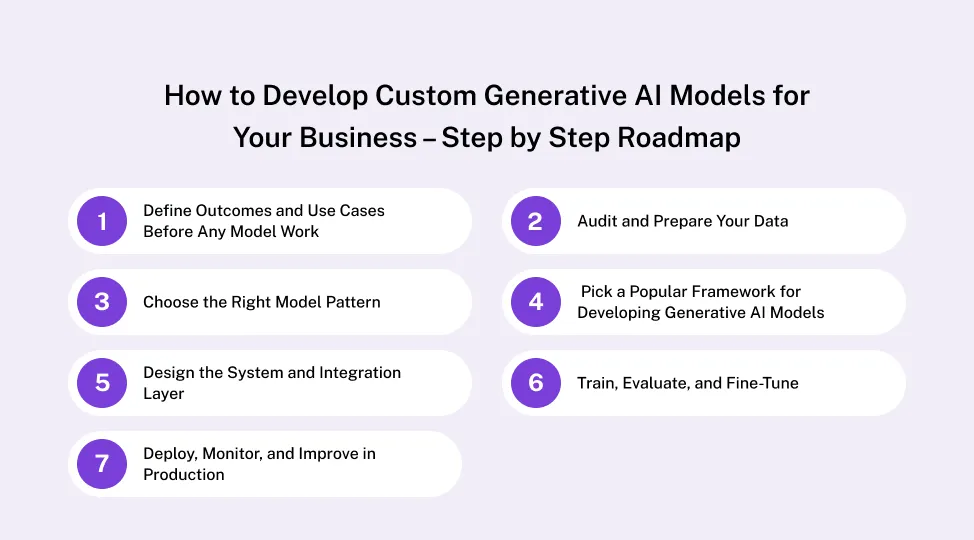
Step 1 – Define Outcomes and Use Cases Before Any Model Work
Before any code, ask: What business outcome should this model improve?
Pick one to three high-value use cases to start:
-
Reduce first response time in support by 30%
-
Cut time to create proposals from 3 hours to 30 minutes
-
Auto-generate internal reports for a specific function
For each use case:
-
Define the decision or task the model will improve
-
List who will use it, in which tool, and at what step
-
Set simple metrics: time saved, error reduction, additional revenue, or NPS impact
This framing is the real start of custom AI model development. You are deciding how AI connects to work, not just how smart the model is.
If you want a deeper strategic view, connect this step to your overall Generative AI Implementation Strategy so pilots line up with your roadmap, not random experiments.
Step 2 – Audit and Prepare Your Data
Almost every serious guide agrees: data work is the biggest success factor in generative AI projects. Poor data quality is a leading reason AI initiatives fail or get abandoned.
For each use case, list:
-
Data sources – documents, tickets, CRM notes, logs, designs, code, spreadsheets
-
Data quality – duplicates, missing fields, outdated content
-
Data governance – consent, privacy rules, retention policies
Use a simple Data Readiness Checklist like this:
| Data Type |
Owner / Team |
Risk Level (L/M/H) |
Readiness (1–5) |
Next Step |
| Support tickets |
CX |
Medium |
3 |
Remove PII, standardize tags |
| Knowledge base |
Product / CX |
Low |
4 |
Fix broken links, update old docs |
| Contracts |
Legal |
High |
2 |
Classify, mask sensitive clauses |
| Design files |
Product / Design |
Medium |
3 |
Clean naming, add metadata |
| Code repos |
Engineering |
High |
4 |
Tag services, add documentation |
This is where custom generative AI model development starts in practice. You are shaping the material that will feed your custom AI models, and you are deciding what cannot be exposed or used.
Step 3 – Choose the Right Model Pattern
You do not always need to train a new model. There are a few common patterns:
1. Prompt engineering on a hosted model
-
Use when: You need quick experiments or simple tasks.
-
Pros: Fast, low effort, no heavy infra.
-
Cons: Limited control, hard to guarantee behavior.
2. Retrieval-Augmented Generation (RAG)
-
Use when: You want answers grounded in your documents.
-
Pros: Keeps data in your control, easier to update knowledge, often lower cost.
-
Cons: Needs good search, chunking, and vector storage design.
3. Fine-tuning a base model
-
Use when: You need your tone, style, or domain reasoning baked into the model.
-
Pros: Better domain performance, more predictable behavior.
-
Cons: Higher cost, requires more MLOps discipline.
4. Training from scratch
-
Use when: Very rare; only for specialized, large-scale needs with unique data.
-
Pros: Maximum control.
-
Cons: Very expensive and slow, not needed for most businesses.
Most enterprise teams start with RAG plus light fine-tuning on key tasks. It balances cost, time, and control for real generative AI model development.
Step 4 – Pick a Popular Framework for Developing Generative AI Models
There are many tools out there. In practice, a small set of popular frameworks for developing generative AI models covers most needs.
Use this as a quick guide:
| Framework / Library |
Best For |
Strengths |
Typical Use in Custom Projects |
| PyTorch |
Text, vision, multimodal |
Widely adopted in research and industry, very flexible. |
Building and fine-tuning custom models, experimental features |
| TensorFlow / Keras |
Production ML at scale |
Mature ecosystem, deployment tooling, Keras high-level API. |
Production-grade systems and cross-platform deployment |
| JAX |
High-performance ML, research |
Great for numerical computing and scalable training. |
Advanced research teams needing speed and hardware control |
| Hugging Face Transformers |
Text, vision, audio, multimodal |
Large catalog of ready models and pipelines. |
Quickly bootstrapping custom generative AI models development |
| LangChain / LlamaIndex |
LLM apps and orchestration |
Simplify RAG, tools, and agent workflows. |
Building chatbots, agents, and retrieval layers over your data |
At Quokka Labs, we usually:
-
Start from your cloud preference and security requirements
-
Choose a core framework (often PyTorch or TensorFlow)
-
Add Hugging Face, LangChain, or LlamaIndex for faster generative AI model development and integration
Step 5 – Design the System and Integration Layer
To develop custom generative AI models that work in the real world, you must design the full system, not just the model.
Key elements:
-
Hosting model: cloud, on-premise, or hybrid
-
APIs and gateways: how frontends and other services call the model
-
Vector database or search layer: for RAG and semantic search
-
Monitoring: latency, cost per request, error rates, and drift
Think of custom generative AI models development as building a new service in your architecture:
-
Decide how it plugs into CRM, ERP, product backend, or design tools
-
Plan feature flags and fallbacks if the model fails
-
Log prompts, responses, and feedback so you can improve the system
Step 6 – Train, Evaluate, and Fine-Tune
Now you move into iterative custom generative AI model development:
1. Prepare datasets
-
Split into training, validation, and test sets
-
Include real-world examples, not just clean samples
2. Run experiments
-
Test different prompts, architectures, and hyperparameters
-
Track each run with clear metrics and notes
3. Evaluate with humans and metrics
-
Build evaluation sets that mirror real tickets, documents, or flows
-
Use domain experts to review outputs for accuracy, tone, and risk
4. Add guardrails and safety checks
5. Check for bias and fairness where relevant
- Especially in HR, lending, and risk-related use cases
Step 7 – Deploy, Monitor, and Improve in Production
Do not roll out to everyone at once. Start with a small pilot:
-
Limit to one team, region, or product area
-
Measure adoption, satisfaction, and impact against your baseline
In production:
-
Track cost per request, latency, and error rates
-
Build feedback buttons directly into the interface
-
Run monthly reviews to update prompts, models, or data sources
This roadmap gives you a repeatable way to develop custom generative AI models that people use every day, not just in one-off demos.
Cost, ROI, and Risk for Custom Generative AI Model Development
Main Cost Drivers
For most organizations, the biggest cost drivers are:
-
Data preparation and governance
-
Compute and infrastructure (GPUs, storage, vector search)
-
Engineering, design, and product time
-
Ongoing monitoring and improvements
Recent industry guides estimate that AI development projects often range from around $50,000 to $500,000+, depending on complexity, data work, and integration depth.
In practice, people and data work often cost more than raw cloud bills.
Simple Cost vs Value Table
Use this lens to plan budgets:
| Cost Item |
One-time or Recurring |
How to Reduce It |
Impact on Quality |
| Data cleaning |
Mostly one-time |
Focus on top use cases first |
High – better answers, fewer failures |
| Model training / tuning |
Mix |
Start small, reuse base models |
Medium to high – improves domain fit |
| Infrastructure (GPU, DB) |
Recurring |
Right-size capacity, autoscaling |
Medium – affects speed and reliability |
| Product & UX work |
One-time + updates |
Reuse patterns, design once for many tools |
High – drives adoption and trust |
| Monitoring & updates |
Recurring |
Automate metrics and alerts |
High – keeps quality from degrading |
Framing ROI
To show clear ROI:
-
Measure time saved per task and multiply by volume
-
Track errors reduced (disputes, rework, escalations)
-
Capture new revenue from AI-powered features in products
Most failures (like the MIT 95 percent figure) come from teams that do not tie models to clear business outcomes or do not measure impact at all.
High-Impact Use Cases for Custom AI Models by Function
Product and Design Teams
For product and design, custom AI models can:
-
Turn product requirements into draft user flows and wireframes
-
Generate UX copy and microcopy that follow your style guide
-
Create design handoff notes from specs and comments
If you want a deeper dive into this area, explore how Generative AI for product design speeds up concepting and iteration inside modern product teams.
Customer Experience and Support
For CX and support teams, custom AI models enable:
-
Answer bots that respond using internal knowledge and resolved tickets
-
Agent copilots that suggest answers and next actions in live chats
-
Automatic tagging, summarization, and routing of incoming requests
Here, custom generative AI models development gives you better control over tone, policy, and escalation than generic tools.
Operations, Finance, and HR
Examples include:
-
Auto-drafting internal reports from raw numbers and logs
-
Summarizing long policy documents into Q and A style answers
-
Extracting key fields from invoices, contracts, and forms
The value is usually time saved and fewer manual errors, not flashy demos.
Industry-Specific Examples
-
Healthcare: summarizing clinical notes, patient education materials
-
Finance: drafting compliant reports and investment summaries
-
Manufacturing: generating maintenance instructions and incident summaries
-
Logistics: route explanation, shipment status narratives, and SOP updates
Once you see where you want to start, the next question is how to roll out safely and at scale.
Governance, Security, and Compliance for Custom Generative AI Models
Strong data governance is now seen as a core reason why some AI projects succeed and many fail. Research shows that poor data quality and governance are among the top causes of AI project breakdowns and crisis-level mistakes.
Key elements for your custom models:
-
Data quality and lineage – know where data came from and how it was processed
-
Access control – enforce role-based access, especially for sensitive data
-
Privacy and retention – respect consent, region rules, and deletion policies
-
Audit logs – record prompts, outputs, and key decisions for review
Optional Risk and Mitigation view:
| Risk Area |
Example |
Control |
| Data leakage |
Model surfaces confidential contract terms |
Mask PII, strict access rules, redaction |
| Hallucinations |
Wrong medical or legal advice |
Grounding via RAG, human review in loop |
| Bias and fairness |
Unequal treatment in HR recommendations |
Bias tests, diverse evaluation sets |
| Compliance breaches |
Output breaks sector rules |
Policy filters, legal sign-off for flows |
Responsible generative AI implementation is not a one-time project. It is a lifecycle that runs alongside your model and product roadmap.
Implementation Steps - From Pilot to Scaled Solution
Use this simple sequence to move from idea to scaled solution:
-
1. Start with one high-value use case
-
2. Build a thin-slice prototype for a small group of users
-
3. Run a 6–8 week pilot with clear metrics and weekly check-ins
-
4. Decide to scale, pause, or pivot based on data and feedback
-
5. Roll out to more teams with training, playbooks, and support
Many step-by-step enterprise guides recommend this phased approach to avoid big, visible failures and to learn fast with limited risk.
If you want a partner to co-own this journey, explore Quokka Labs’ generative AI development services and see how our team helps you move from pilots to reliable systems.
Common Pitfalls When You Develop Custom Generative AI Models (and How to Avoid Them)
Building Without a Clear Use Case
Jumping into models or tools without a defined outcome leads straight to the 95 percent failure bucket. Start with one high-value, well-scoped use case.
Ignoring Data Work and Governance
If you skip data cleaning, classification, and access control, your model will surface outdated, biased, or sensitive content. Make data work a first-class part of the project.
Overengineering the First Version
Training from scratch, designing complex agent graphs, or adding too many features early usually slows learning. Start simple: RAG + fine-tuning + clear UX.
No Clear Owner After Launch
Models drift and products evolve. Assign a product owner or small squad to own the model, metrics, and improvement backlog.
Conclusion and Next Steps
Building value from generative AI is not about chasing the latest model name. It is about:
-
Choosing the right use cases
-
Getting your data ready
-
Picking the right model pattern and frameworks
-
Designing solid integrations and governance
-
Iterating from pilot to scale with clear metrics
When you develop custom generative AI models around your own workflows and constraints, you turn AI from a lab experiment into a reliable business system.
Start small: pick one use case, map your data, and sketch a simple pilot. From there, you can grow into a robust portfolio of custom AI models that power many parts of your organization.



 Facebook
 Twitter
 LinkedIn
 Pinterest