Did you know that React Native holds a 35% market share in cross-platform app development, and over 14.5% of developers actively build apps with it? The official React Native site confirms thousands of apps use the framework, spanning startups to Fortune 500 companies, a credible testimony of real‑world adoption, saving 30% of their development cost and time.
Traditionally, building separate apps for iOS and Android means doubling your development efforts. But with React Native, companies can create high-quality apps using a single codebase for both platforms.
In this blog, we’ll explore the benefits of using React Native, its challenges, and how partnering with an expert mobile app development company can help you harness its full potential.
Why Choose React Native for App Development?
React Native cross platform app development is an open-source framework that allows developers to build mobile applications using JavaScript and React, enabling a single codebase for both iOS and Android platforms.
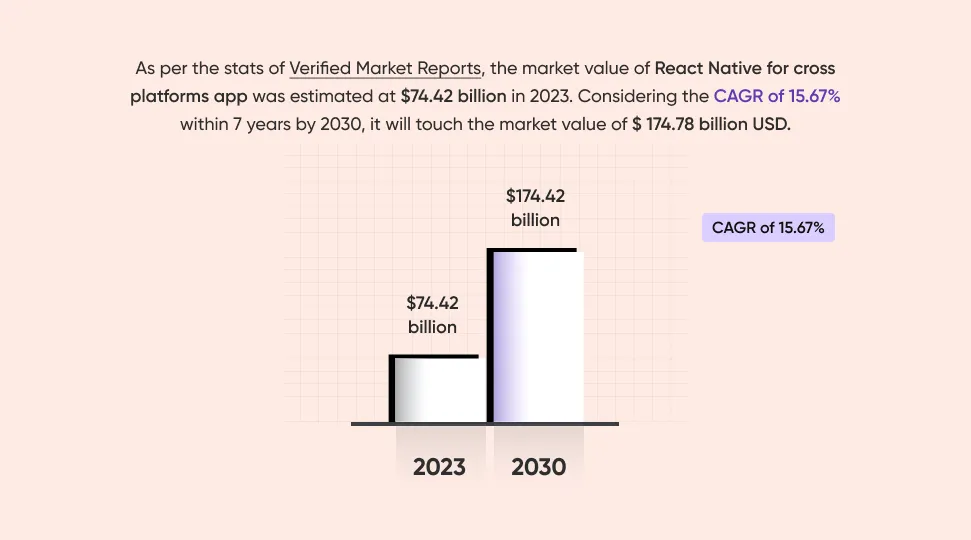
As per the report of Verified Market Reports, the market value of React Native for cross-platform apps was estimated at $74.42 billion in 2023. Considering the CAGR of 15.67% within 7 years by 2030, it will touch the market value of $ 174.78 billion USD. React Native drives the momentum to cross-platform solutions without compromising performance and security. It can boost user engagement, conversion, app downloads, and revenue, minimizing the bounce rate.

Here’s why businesses rely on React Native cross platform development:
Core Business Benefits
React Native cross platform app development offers several advantages for businesses, including cost savings, faster time-to-market, wider reach, and easier app maintenance. Here's why businesses choose a React Native app development company to build their apps:
1. Cost-Effectiveness
By leveraging a single codebase for both iOS and Android, businesses can save on the cost of hiring separate development teams for each platform. This significantly reduces the resources needed for the development process, leading to overall cost savings.
2. Faster Time-to-Market
React Native's ability to reuse code across both platforms (up to 90% code reuse) accelerates the development process. Additionally, React Native allows developers to deploy updates simultaneously on both platforms, cutting down on the time required to roll out new features and updates, enabling a quicker go-to-market time.
3. Wider Audience Reach
Developing for both iOS and Android simultaneously ensures that the app reaches the two dominant mobile platforms with a single development effort. This broadens the potential user base and maximizes market reach without doubling development costs and time.
4. Easier Maintenance and Updates
With a unified codebase, ongoing maintenance and updates become simpler. Minor updates can often be delivered over-the-air (OTA), without requiring a full app store review, ensuring quicker fixes, faster releases, and less downtime.
Also Read: How Much Does Mobile App Development Cost
Core Technical & Developer Benefits
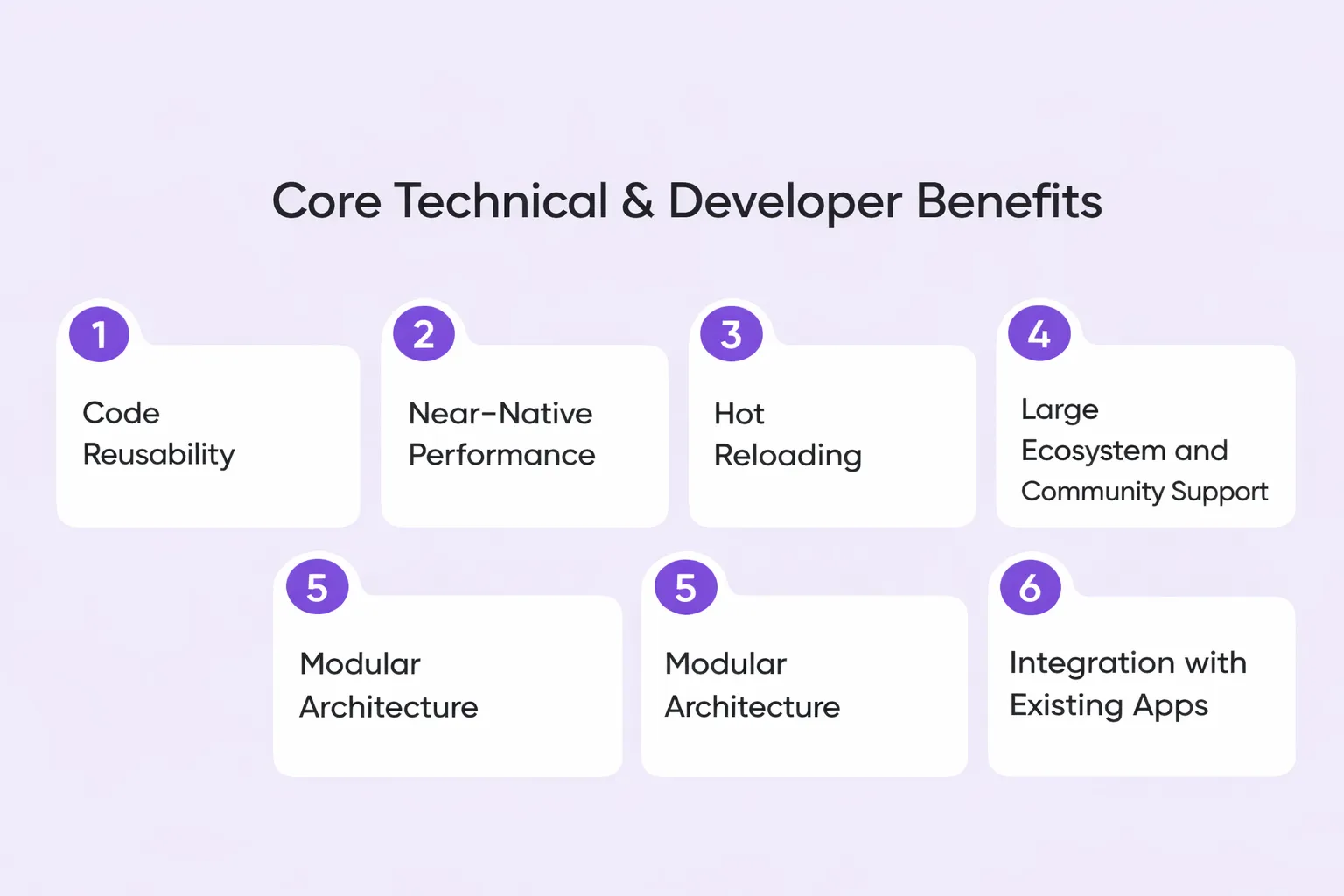
Mobile app development with React guide developers and provides them with code reusability, near-native performance, hot reloading, and strong community support, enhancing app development.
1. Code Reusability
React Native’s core principle, "learn once, write anywhere," allows developers to write the majority of the code once and deploy it across both platforms. This reusability not only saves time but also ensures consistency across the app's experience on different devices.
2. Near-Native Performance
React Native provides native UI building blocks and components, which are compiled directly into native code, ensuring that the final app performs and feels like a true native application. This near-native performance makes React Native suitable for apps requiring high responsiveness and seamless user interaction.
3. Hot Reloading
One of React Native’s standout features is hot reloading, which allows developers to instantly see the results of their code changes in a live preview without recompiling the entire app. This speeds up the debugging process, improves development efficiency, and allows for quicker iterations in design and functionality.
4. Large Ecosystem and Community Support
Backed by Meta and a large, active open-source community, React Native has access to a wealth of resources. Developers can leverage third-party libraries, pre-built solutions, and tutorials that significantly simplify development and problem-solving. This extensive community support means that most development issues have pre-existing solutions.
5. Modular Architecture
React Native’s modular architecture allows developers to break the app into reusable components or modules. This structure improves team collaboration, as different parts of the app can be developed in parallel and simplifies maintenance and updates since each module is isolated and can be modified independently.
6. Integration with Existing Apps
React Native’s flexibility allows developers to integrate its components into an existing native application. This enables businesses to gradually adopt React Native without a full rewrite, making it easier to transition from traditional app development to cross-platform solutions.
Suggested Read: Top Benefits of React Native for App Development
Steps for Building a Cross-Platform App with React Native
A React Native or Flutter app development company uses several key steps, from setting up the development environment to deploying the final product. Let’s learn the step-by-step approach these companies follow to simplify your app development process.
1. Set Up the Development Environment
The first step is to prepare your development environment. This includes installing essential software and platform-specific tools needed for React Native development.
Install Node.js and npm
Node.js and npm are necessary for running JavaScript outside the browser and managing dependencies. You can download the latest version from the official Node.js website. These tools are essential for managing your React Native project’s dependencies.
Install Platform-Specific Tools:
-
For Android: Download and install Android Studio to set up the necessary SDKs and emulators. Android Studio provides an integrated development environment (IDE) to develop, test, and debug your Android apps.
-
For iOS (macOS required): Install Xcode from the Mac App Store and run xcode-select --install in your terminal to install command-line tools. Xcode is essential for developing, debugging, and testing iOS applications.
Choose a Workflow (CLI or Expo):
React Native offers two main workflows for setting up and managing projects:
-
React Native CLI: This option provides more control over native code and configurations, offering greater flexibility for complex projects.
-
Expo: A more simplified development experience, Expo handles most configurations automatically and enables easy testing on physical devices using the Expo Go app. It’s ideal for faster prototyping and less complex apps.
2. Create a New Project
After setting up your development environment, the next step is to create your React Native project.
For React Native CLI
Run the following command in your terminal to create a new project:
</> Bash

npx react-native init MyApp
This command will set up a new project folder with all the necessary files and dependencies for your app.
For Expo CLI
If you're using Expo, run:
</> Bash

npx create-expo-app@latest MyApp
This will create a project with Expo pre-configured, making it easier for you to get started with cross-platform app development.
Navigate into Your Project Directory
After creating your project, navigate to the directory:
</> Bash

cd MyApp
3. Run the App in Development
Once the project is created, it’s time to see it run in development mode.
For Android
Start the development server and launch the app on an Android emulator or a connected Android device by running:
</> Bash

npx react-native run-android
For iOS (macOS only)
If you’re developing for iOS, use the following command to run the app on an iOS simulator:
</> Bash

npx react-native run-ios
Using Expo
If you’re using Expo, run:
</> Bash

npx expo start
4. Build the User Interface
The next step is to design the user interface (UI) of your app. React Native cross platform app development allows you to build your UI using components that are similar to web development.
Core Components
Use basic React Native components such as
<View>, <Text>, <Image>, and <Button>
to structure the UI of your app. These components are similar to HTML elements, making it easier to transition from web development to mobile development.
Styling
React Native uses Flexbox for layout, which ensures a responsive design across various screen sizes. You can style your components using StyleSheet for modular and reusable styles. React Native’s styling approach is highly flexible, allowing developers to create complex, responsive layouts without worrying about platform-specific differences.
5. Manage State and Data
Managing data and state is essential for ensuring your app functions smoothly.
For Simple Apps
Use React's built-in useState hook to manage the state at the component level. This is ideal for small-scale apps that don’t require a lot of complex data handling.
For Complex Apps
For larger applications with more intricate data management needs, consider using state management libraries like Redux or Context API. Redux is especially useful when your app has multiple components that need to share state or when you need to manage global state across various parts of your app.
6. Implement Navigation
React Native cross platform app development provides an easy way to implement navigation between different screens in your app.
React Navigation
One of the most popular libraries for navigation in React Native is React Navigation. It allows you to easily create stack navigation, tab navigation, and drawer navigation, making it simple to handle transitions and navigation between different parts of your app.
7. Test and Debug
Testing and debugging are crucial for delivering a polished app.
Unit Testing
Use Jest to write unit tests for your React Native components. Jest is an easy-to-use testing framework that integrates well with React Native.
End-to-End Testing
Use tools like Detox for end-to-end testing to simulate user interactions and ensure that your app behaves correctly under real-world conditions.
Debugging Tools
React Native provides debugging tools like React Native Debugger and Flipper, which can help you inspect your app and track down issues quickly.
8. Prepare and Deploy
After development and testing, the final step is to prepare your app for deployment.
Clean Up the Code
Before releasing your app, remove any unnecessary files, optimize assets, and configure app icons and launch screens to ensure a smooth user experience on different devices.
Generate Release Build:
Deployment
Follow the respective submission process for the Google Play Console and Apple App Store Connect to make your app available for users to download and install.
Why React Cross Platform is Better Than Other Frameworks?
When deciding between React Native, Flutter, and Kotlin Multiplatform for cross-platform app development, React Native stands out for several reasons. Here’s why React Native often outperforms Kotlin vs Flutter vs React Native comparisons:
1. Performance and Development Speed
-
React Native uses native components, providing a near-native performance.
-
Flutter has its own rendering engine, which can slow down development.
-
React Native allows faster development due to code reusability across platforms.
2. Code Reusability and Ecosystem
-
React Native enables a single codebase for both iOS and Android.
-
Kotlin Multiplatform shares only business logic, requiring separate UI code.
-
React Native benefits from a vast ecosystem and community-driven libraries.
3. Developer Support and Resources
-
React Native has one of the largest, most active communities.
-
Flutter and Kotlin are still growing and have smaller ecosystems.
-
A larger community means faster problem-solving and more resources.
4. Cost-Effectiveness
Common Challenges in React Native App Development and How to Overcome Them
While React Native cross platform development offers many benefits, there are certain challenges that developers may encounter during the app development process. These challenges can be mitigated with the right strategies and tools.
1. Performance Issues
One of the most common challenges faced when developing with React Native is performance issues, particularly when dealing with resource-heavy applications.
Complex animations, high-resolution images, and real-time data processing can sometimes cause lag or slower performance compared to fully native apps.
This can be particularly noticeable in apps that require heavy user interaction or advanced graphics, such as gaming or AR/VR apps.
How to Overcome It?
To overcome performance issues, developers can optimize app performance by:
-
Reducing unnecessary re-renders using tools like React.memo and PureComponent to ensure only relevant components are updated.
-
Offloading intensive computations to native code (via bridges or custom native modules) for better processing efficiency.
-
Leveraging code-splitting and lazy loading techniques to ensure the app only loads what’s necessary at any given time.
2. Native Code Integration
While React Native cross platform app development allows for most functionality to be built using JavaScript, there are cases where native code (iOS or Android-specific code) is necessary to access certain device features or optimize performance.
Integrating native code into React Native can be complex, especially for developers who are less familiar with Android or iOS development.
How to Overcome It?
Developers can tackle this challenge by:
-
Using native modules to write and integrate platform-specific code when needed. React Native allows you to bridge JavaScript with native code to access platform-specific APIs, like sensors, camera, or advanced graphics.
-
Leveraging libraries such as React Native Modules to access device features that aren’t available in React Native by default.
-
Keeping native code isolated in small, well-documented modules so that it doesn’t affect the maintainability of the overall codebase.
3. Debugging Across Platforms
Another challenge in React Native cross platform development is ensuring that the app works consistently across both iOS and Android.
Different behaviors, bugs, and inconsistencies can arise from platform-specific differences, and debugging can be a time-consuming process, especially when working with cross-platform apps.
How to Overcome It?
To address cross-platform debugging, developers can:
-
Use React Native Debugger or Flipper to debug and inspect app performance, network requests, and UI behavior across platforms.
-
Leverage platform-specific logging to identify and fix issues that occur only on iOS or Android.
-
Implement Automated Testing tools like Jest or Detox to ensure your app behaves consistently on both platforms, even after updates.
By understanding these common challenges and adopting effective strategies, React Native developers can significantly improve the performance, flexibility, and consistency of their cross-platform applications.
How Quokka Labs Can Help You With React Native App Development?
At Quokka Labs, we specialize in building scalable and high-performance mobile applications using React Native. Whether you’re a startup or an enterprise, our expert team helps you develop cross-platform apps that deliver a seamless user experience on both iOS and Android.
We take a collaborative approach, tailoring solutions to meet your business needs, from intuitive UI/UX design to performance optimization and third-party integrations.
Our agile development process ensures fast, efficient delivery, while features like hot reloading speed up testing and iteration. We provide post-launch support to maintain your app, ensuring it stays up to date and performs optimally as your business grows.

Conclusion
React Native offers numerous benefits for businesses looking to build cross-platform apps efficiently. By using a single codebase for both iOS and Android, companies can reduce development time and costs, while still delivering high-performance apps with a seamless user experience.
The framework’s flexibility, code reusability, and strong community support make it an ideal choice for startups and enterprises alike. Whether you're looking to develop a new app or enhance an existing one, React Native can streamline your development process and accelerate time-to-market.
Ready to start your cross platform app React Native journey? Contact our experts today to discuss how we can bring your mobile app vision to life.
Frequently Asked Questions
What is React Native cross platform app development?
React Native cross platform app development is the process of building mobile apps for both iOS and Android using a single codebase. Instead of creating two separate apps from scratch, businesses can use React Native to speed up development, reduce cost, and maintain a more consistent user experience across platforms.
Why choose React Native for cross platform app development?
Businesses choose React Native for cross platform app development because it supports faster delivery, code reuse, and lower maintenance effort. It is especially useful for startups and growing companies that want to launch on both iOS and Android without doubling development time and budget.
React Native vs Flutter: which is better?
React Native is often a better choice for teams that already work with JavaScript and want access to a mature ecosystem, faster hiring, and easier integration with existing apps. Flutter is strong for highly custom UI experiences, but the better framework depends on your product goals, team expertise, performance needs, and long term maintenance plan.
Explore more for detailed study: React Native vs. Flutter: Best for Mobile App Development?
Is React Native good for enterprise mobile apps?
Yes, React Native can be a strong choice for enterprise mobile apps. It works well for businesses that need cross platform reach, scalable architecture, faster releases, and integration with backend systems. However, apps with heavy graphics, advanced animations, or deep hardware dependency may still need some native development.
How much does React Native app development cost?
React Native app development cost depends on the scope of the app, feature complexity, integrations, design requirements, testing needs, and post launch support. A simple MVP can cost much less than a large enterprise app with custom workflows, real time features, and backend integrations.
What are the challenges in React Native cross platform app development?
Common challenges in React Native cross platform app development include performance optimization for complex apps, platform specific debugging, dependency management, and occasional native module integration. These challenges can usually be solved with strong architecture, proper testing, and an experienced development team.
Tags
Cross-Platform
React Native Services
React Native development
Cross-Platform Development