
Technology


5 min

Protect your mobile product with practical react native security steps for 2026. This guide covers common risks, secure storage, safer API calls, token handling, dependency checks, and secure release workflows. Learn react security best practices and react native best practices that reduce data leaks, prevent tampering, and improve user trust.

By Dhruv Joshi
03 Feb, 2026
Your app can look great and feel fast. But if it leaks data once, users don't forgive easily. That is why react native security is not a checkbox; it is product trust.
Here’s what’s scary: modern apps are built on big ecosystems. Open source, SDKs, analytics tools, push vendors, and auth providers. And those pieces can break. One industry report highlights that 86% of audited apps contained open-source vulnerabilities, and 81% included at least one high or critical open-source vulnerability. (Source: OpenText) That is not about React Native only. It is the reality of mobile software today.
The impact is also real money. IBM averaged the global cost of a data breach reached USD 4.88 million in 2024. (Source: IBM) Even if your org is smaller, the cleanup work is painful: user support, hotfix releases, compliance questions, and a brand hit that lasts.
In this guide, we’ll cover the top risks, practical solutions, and react security best practices you can apply right now. We’ll also connect it to react native best practices across code, APIs, and your release pipeline.
To make good choices about protection, we first need a clear picture of what react native security really means for a modern app.
Let’s keep this simple. React native security means protecting user data, business logic, and system access across the full journey:
React Native needs its own security lens because it blends JavaScript, native modules, and a dependency heavy ecosystem. That mix is powerful, but it also creates extra places where mistakes happen. The good news: React Native can be as secure as native apps when you apply the right controls and follow steady react native best practices.
At Quokka Labs, when we do a security review, we usually don’t start with “tools”. We start with:
what sensitive data the app handles
Modern react native security should map to proven mobile security frameworks, not personal preference. The most referenced ones are OWASP Mobile Top 10 (common mobile risks) and OWASP MASVS (Mobile Application Security Verification Standard).
The practical steps in this guide align with those standards by focusing on secure storage, safe network transport, strong authentication, dependency hygiene, and secure build and release workflows. Use this as a lightweight baseline, then apply stricter controls for regulated apps.
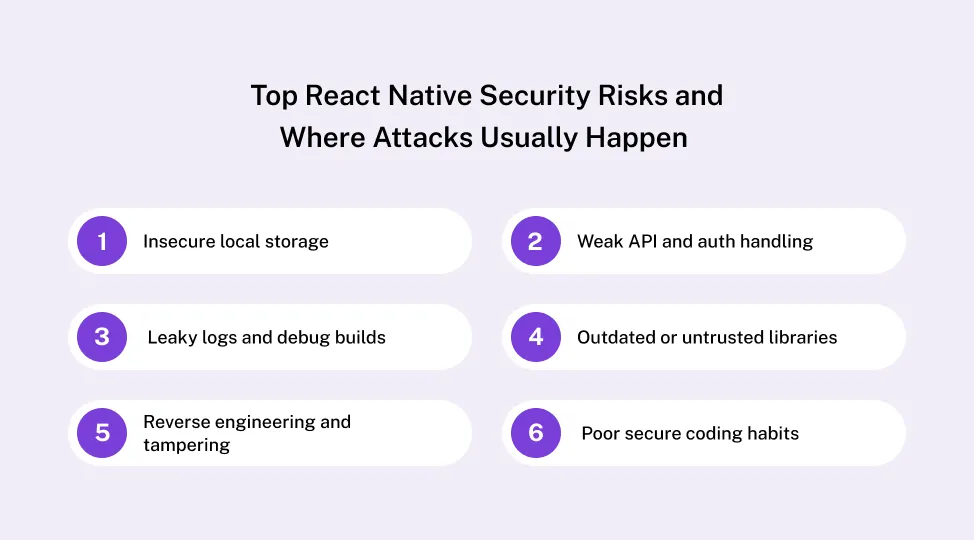 Most security issues come from repeating patterns, not from React Native itself. If you learn those patterns, your react native security posture improves fast.
React Native’s own security guidance is clear: AsyncStorage is unencrypted and should not be used for token storage or secrets.
Tokens or personal data stored in AsyncStorage can be extracted from device backups, rooted phones, or repackaged builds in minutes - no advanced exploit or zero-day required.
Mobile apps should never be treated as trusted clients; any attacker can inspect, replay, or modify requests.
Sensitive data in logs, crash reports, and analytics events
Debug flags accidentally left on in production
Packages with known vulnerabilities and no patch plan
Risky third party SDKs shipped as binaries, hard to inspect
Supply chain risk is now a top mobile risk category.
Easy to inspect JS bundles if you do nothing
Attackers patch APKs, inject hooks, bypass checks
Obfuscation and tamper checks raise attacker effort, but they do not make reverse engineering impossible — they buy time, not immunity.
No input validation
Overly detailed error messages
Missing basic react security best practices like strict auth boundaries
Knowing your main risk zones makes it easier to design practical defenses that fit React Native, not fight it.
On device security is not just about “hackers in hoodies”. It is about real life situations:
A mobile threat report also notes that 25.3% of devices were not upgradeable due to device age, and sideloaded apps were present on 23.5% of enterprise devices. Older and unmanaged devices increase risk, even if your code is clean.
Offline mode is great. But it can quietly destroy react native security if you cache too much.
Try this approach: -store only what the user needs for the next session, not the full history
This is one of those boring react native best practices that saves you later. Document what you store, why you store it, and how long it stays.
Securing what sits on the device is step one. Next, you have to protect everything that moves over the network.
React Native apps live and die on APIs. If your API layer is weak, your react native security is weak too, no matter how clean the UI code is.
React Native’s own security docs recommend SSL and also explain SSL pinning and the risks it reduces, plus the operational cost of certificate expiry.
Even if your data is safe at rest and in transit, weak code and dependencies can still open the door.
Strong react native security depends on how you write code and how you ship it. That’s where most leaks happen, honestly. Not from “zero days”, but from messy habits.
A small detail that bites teams: crash tools. React Native warns about accidentally sending tokens or personal info to monitoring tools. So scrub logs before they leave the device.
This is pure react native best practices meets DevSecOps:
With a solid coding and delivery base in place, you can take security a step further by using the React Native ecosystem and new architecture wisely.
💡Suggested Read: React Native Performance Optimization
React Native is changing fast. New architecture, new renderers, and new native module patterns are improving performance, but they also expand the security surface, which is why React Native app development today requires tighter control over what runs on the device and what interacts with native APIs.
You don’t need the deep internals here. Just remember:
So for react native security, treat native modules like backend code:
Also, security and performance often align. Fewer dependencies, less bloat, fewer risky SDKs. That’s both better react native security and better user experience.
Security also involves how your app behaves when something goes wrong. Logs, errors, and monitoring matter a lot here.
You cant fix attacks or leaks you never see. Monitoring is not paranoia. It is basic ops.
React Native’s security guidance calls out a common mistake: accidentally storing or exposing sensitive info through app state persistence or sending it to monitoring tools.
If you discover a serious react native security issue:
All of this can sound like a lot, so a simple checklist goes a long way to keep your team on track.
This is the section your team can reuse every release. It’s practical, not perfect. And it keeps react native security visible.
| Area | Risk example | Recommended solution |
|---|---|---|
| Local storage | Tokens in AsyncStorage | Use Keychain and Keystore based secure storage |
| Network/API | Weak TLS or insecure transport | Enforce HTTPS, consider SSL pinning for sensitive apps |
| Auth | Long lived sessions | Short lived access tokens, refresh flow, rotation |
| Code and secrets | Hardcoded keys in app bundle | Move secrets server side, use an orchestration layer |
| Dependencies | Unpatched vulnerable packages | Regular scans, update policy, curated libraries |
| Build pipeline | Secrets shared in repo or CI logs | Secret manager, restricted access, audit trails |
| Reverse engineering | Easy bundle inspection | Obfuscation, tamper checks where needed |
| Logging | Sensitive data in prod logs | Scrubbing and safe log levels |
If your app handles sensitive data or sits at the core of your business, it often makes sense to bring in a team that lives and breathes this every day.
Sometimes a checklist isn’t enough. Not because your team is weak, but because priorities are real. Features ship. Deadlines happen.
Strong react native security is not one tool, or one audit, or one “secure sprint”. It is layered protection across device, network, backend, code, and process.
If you do nothing else, do these three:
Start small. Run the checklist in this guide. Pick 1 or 2 fixes per quarter. That’s how security becomes normal work, not emergency work.
And if you want expert help tightening security without slowing delivery, Quokka Labs, an AI native engineering company, can support you with secure React Native builds, security testing, and safer backend and DevOps practices.

React Native App Security: Risks, Solutions, and Best Practices
By Dhruv Joshi
5 min read
React Native Performance Optimization: Tools, Tips & Benchmarks
By Dhruv Joshi
5 min read
How Much Does a React Native App Cost in 2026? Complete Breakdown
By Dhruv Joshi
5 min read
Generative AI for Customer Experience: Use Cases, Architecture, ROI, and Implementation
By Dhruv Joshi
5 min read

Technology
5 min
Discover how to boost React Native performance with this in-depth guide. Learn practical React Native performance optimization techniques, must-have performance tools, real-world benchmarks, and monitoring workflows to keep apps smooth, fast, and stable in production. See how to measure, debug, and improve React Native app performance step by step, reduce crashes, and deliver better mobile experiences across iOS and Android while keeping development costs and efforts under control.

Technology
5 min
Discover the real React Native app development cost in 2026 with this detailed guide from Quokka Labs. Learn how features, design, backend, team model, and region shape your React Native app cost, plus realistic pricing tiers, hidden maintenance expenses, and cost-saving tips. Use our step-by-step framework to estimate the cost to build a React Native app and plan a clear roadmap for your startup or product growth in 2026 strategy.

Technology
7 min
Generative AI is moving fast into enterprises, from banks to hospitals to government agencies. Adoption is rapid, but security planning lags. Unlike traditional systems, these models can be exploited through prompt injection, poisoned data, or manipulated to leak sensitive information. They are also misused for phishing, deepfakes, and malicious code.


Feeling lost!! Book a slot and get answers to all your industry-relevant doubts

 Facebook
 Twitter
 LinkedIn
 Pinterest


