Choosing between Kotlin Multiplatform vs Flutter is no longer just a developer or business debate. It is a decision that directly affects your app’s speed to market, user experience, budget, scalability, and long-term maintenance.
If you are comparing flutter vs Kotlin, chances are you are planning a new mobile product, modernizing an existing app, or looking for the fastest route to launch across Android and iOS without compromising quality. And that is exactly where this guide helps.
Both frameworks are powerful. Both reduce duplication. Both support cross-platform delivery. But they solve different business problems in different ways.
In this blog, we break down Kotlin vs flutter, compare real-world use cases, explain when each framework wins, and help you choose the right technology based on your product goals, team structure, and growth roadmap.
Quick Answer: Kotlin Multiplatform vs Flutter
-
Choose Flutter if you want faster UI development, a highly consistent design across platforms, and a shorter time-to-market for MVPs and customer-facing apps.
-
Choose Kotlin Multiplatform if you want to share business logic across platforms while keeping native UI experiences on Android and iOS.
So, in the debate around flutter vs Kotlin multiplatform, there is no one-size-fits-all winner. The right choice depends on whether your priority is shared UI and speed or native flexibility and shared logic.
If you are evaluating cross-platform development more broadly, start with this guide on Flutter for mobile app development.

Why This Comparison Matters for Modern App Teams
Today’s app leaders are under pressure to launch faster, optimize engineering costs, and deliver polished experiences across multiple platforms. That is why the conversation around Kotlin multiplatform mobile vs flutter has become so important.
Businesses no longer want to maintain two fully separate codebases unless there is a very strong reason. They want:
-
faster releases
-
lower development overhead
-
better user retention through smoother UX
-
room to scale without replatforming too early
This is also why many teams are exploring the Future of Flutter Development before locking in their technology strategy.
Cross-Platform App Development: Benefits and Trade-Offs
Cross-platform development allows businesses to build applications for multiple operating systems using a shared codebase or shared logic. For startups and growth-stage companies, that can significantly reduce time, effort, and cost.
Key benefits of cross-platform development
-
Faster product launch across Android and iOS
-
Lower engineering effort compared to maintaining separate teams
-
Better feature consistency across platforms
-
Easier ongoing maintenance and updates
-
Faster experimentation during MVP and growth phases
Common challenges
-
Platform-specific features may still need native code
-
Performance tuning can vary by use case
-
UI consistency and native feel may require careful trade-offs
-
Debugging can become complex in mixed architecture setups
For brands evaluating a partner-led build, working with a custom Flutter app development company can reduce implementation risk and speed up delivery.
Read More- How to Build Cross-Platform Apps with Kotlin Multiplatform
What is Kotlin Multiplatform?
Kotlin Multiplatform is a development approach that lets teams share business logic, data models, networking, and other core layers across platforms while keeping platform-specific UI where needed.
In simple terms, Kotlin Multiplatform is ideal for companies that want to:
-
preserve native UI on iOS and Android
-
reuse core logic across platforms
-
reduce duplicate engineering work
-
integrate with existing native apps gradually
This makes Kotlin multiplatform vs flutter a strategic choice between partial sharing and full UI-led cross-platform development.
Best-fit use cases for Kotlin Multiplatform
-
apps with strong native experience requirements
-
products with existing Android or iOS codebases
-
teams with Android/Kotlin expertise
-
businesses prioritizing platform-specific customization
What is Flutter?
Flutter is Google’s UI toolkit for building mobile, web, and desktop apps from a single codebase. It uses Dart and gives developers control over the UI layer through a rich widget-based architecture.
Flutter is often chosen when teams want:
rapid UI development
a visually consistent experience across platforms
faster MVP launches
a single team managing one codebase
If you are new to the ecosystem, read What is Flutter for a foundational overview.
Best-fit use cases for Flutter
-
MVPs and startup products
-
apps with custom branded UI
-
eCommerce, healthcare, fintech, and on-demand apps
-
businesses optimizing for speed and cost efficiency
Kotlin vs Flutter: Core Difference in One Line
The biggest difference between Kotlin vs flutter is this:
That distinction influences almost every downstream decision: cost, speed, UX consistency, architecture, hiring, and maintenance.
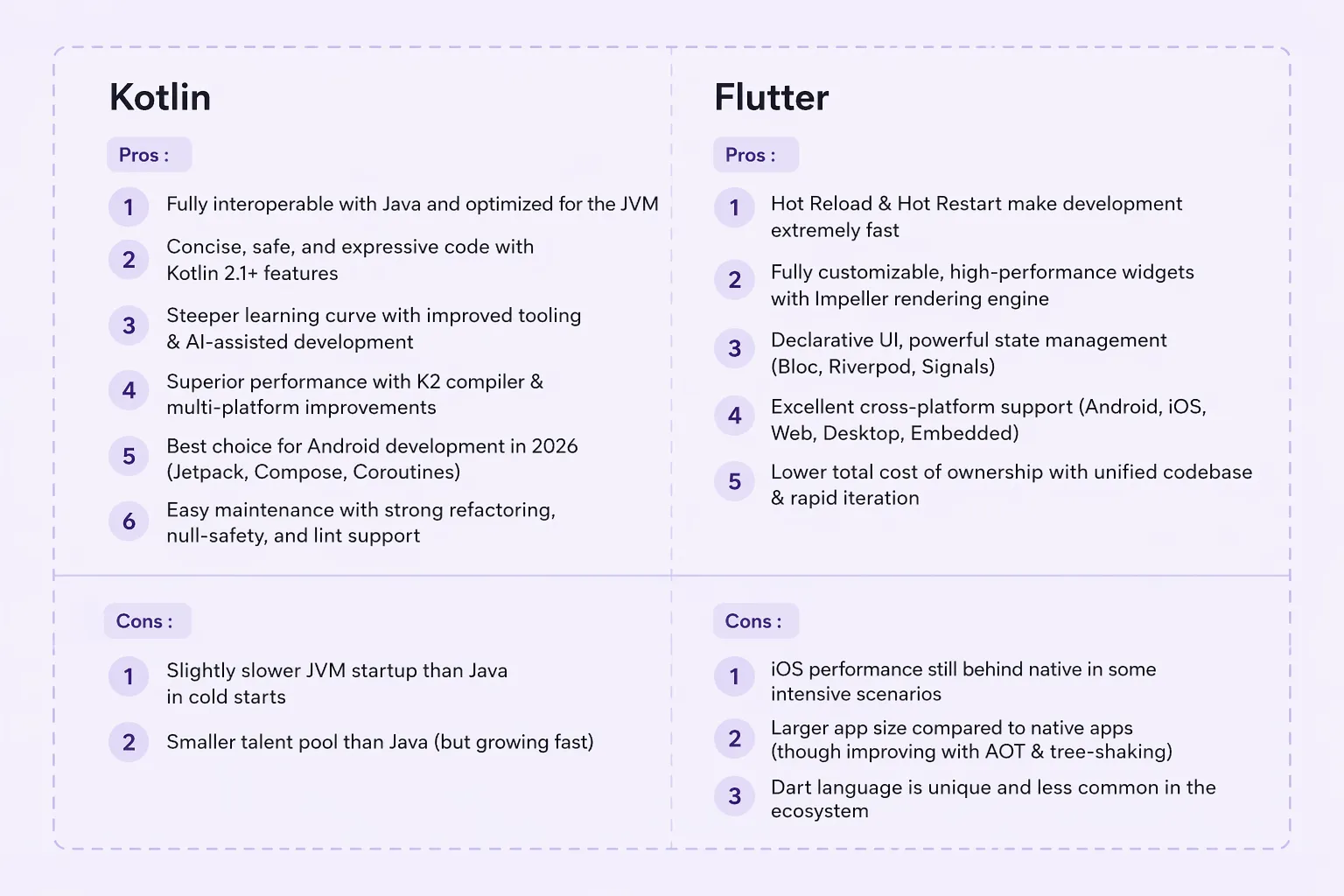
Kotlin Multiplatform vs. Flutter: Advantages & Disadvantages
Have a look at the below tables to understand the pros and cons of both.
Flutter vs Kotlin Multiplatform: Head-to-Head Comparison
| Parameter |
Flutter |
Kotlin Multiplatform |
| Primary Language |
Dart |
Kotlin |
| Code Sharing |
UI + business logic |
Primarily business logic |
| UI Approach |
Shared widget-based UI |
Native UI for each platform |
| Time-to-Market |
Faster for MVPs and multi-platform launches |
Faster if native UI already exists |
| Performance |
Strong for most app use cases |
Strong, especially with native UI layers |
| Developer Experience |
Excellent for rapid iteration |
Great for Kotlin-native teams |
| Custom Native Integration |
Possible, but may require bridges |
Naturally strong |
| Best For |
Fast launch, consistent UI, cost efficiency |
Native feel, gradual adoption, logic sharing |
Performance Comparison: Which One Is Faster?
When evaluating flutter vs Kotlin, performance is one of the first concerns. The truth is that both can deliver high-quality app experiences, but the answer depends on what you mean by performance.
Flutter performance
Flutter delivers excellent performance for most business applications because it renders its own UI and supports fast iteration. It is especially strong for apps that need smooth animations, branded interfaces, and rapid UI changes.
Kotlin Multiplatform performance
Kotlin Multiplatform can be highly efficient because teams often keep the UI native while sharing business logic. That makes it attractive for apps where platform-specific interactions, OS integrations, or native polish matter deeply.
Speed comparison of programming languages
If your team is searching for a speed comparison of programming languages, that question usually misses the real product decision. End-user performance depends less on language alone and more on architecture, rendering approach, native integrations, memory usage, app complexity, and implementation quality.
Verdict on performance
-
Choose Flutter for fast, polished, cross-platform UI delivery.
-
Choose Kotlin Multiplatform when native UI performance and OS-level control are top priorities.
If performance benchmarking is part of your evaluation, this comparison of Swift vs. Flutter can help frame native vs cross-platform trade-offs more clearly.
UI and User Experience: Which Framework Delivers Better UX?
This is where kotlin multiplatform mobile vs flutter becomes a product strategy question.
Flutter for UI consistency
Flutter is excellent for teams that want one visual language across Android and iOS. If brand consistency matters more than platform-specific UI conventions, Flutter is often the better choice.
Kotlin Multiplatform for native feel
Kotlin Multiplatform gives teams freedom to build fully native UIs on each platform. That can be a better fit when users expect each app to feel deeply aligned with Android and iOS patterns.
Verdict on UX
Developer Experience and Learning Curve
The flutter vs Kotlin discussion also affects hiring and team productivity.
Flutter learning curve
Flutter requires teams to learn Dart and adapt to Flutter’s widget-driven approach. For many developers, this is manageable and productive once the team gets used to the framework.
Kotlin Multiplatform learning curve
Kotlin is especially appealing for Android-first teams and developers already comfortable with JVM ecosystems. It feels more natural if your team already works with Kotlin or has native mobile expertise.
Verdict
To strengthen the business case internally, many teams also review the Benefits of Flutter for App Development before making a final platform call.
Time-to-Market: Which One Helps You Launch Faster?
For most startups and digital product teams, speed matters more than theoretical elegance. This is where Flutter often has a strong edge.
Flutter and fast launches
Flutter allows teams to build one UI system for multiple platforms. That speeds up prototyping, QA, iteration, and release cycles.
Kotlin Multiplatform and phased migration
Kotlin Multiplatform can be faster if you already have native apps and want to share only core logic without rebuilding the front end.
Verdict on launch speed
-
New product, MVP, or design-heavy app: Flutter
-
Existing native app needing shared logic: Kotlin Multiplatform
If budget and timeline are central to the decision, this guide on Flutter App development Cost is a useful next read.
Cost of Development and Maintenance
Cost is where business stakeholders pay closest attention, and rightly so.
Flutter cost advantage
Because Flutter enables broader code sharing, many businesses reduce development effort, simplify maintenance, and avoid managing separate platform-heavy workflows.
Kotlin Multiplatform cost advantage
Kotlin Multiplatform can still reduce cost by sharing backend-like logic across apps, especially when a company wants to preserve its native investment rather than rebuild from scratch.
Verdict on cost
Community, Ecosystem, and Long-Term Support
A healthy ecosystem matters for hiring, troubleshooting, plugin access, and long-term scalability.
Flutter ecosystem
Flutter has a strong ecosystem, broad community adoption, and a large set of packages for rapid app development.
Kotlin ecosystem
Kotlin benefits from strong developer trust, deep Android relevance, and excellent fit for modern mobile architecture - especially in organizations already invested in JetBrains and Android tooling.
Verdict
For teams tracking framework evolution, Whats new in Latest Version of Flutter 3.41.5? can help connect technical upgrades to product planning.
When to Choose Flutter & When to Choose Kotlin Multiplatform
Choose Flutter if your business needs:
-
a fast MVP launch
-
one codebase for Android and iOS
-
a visually rich, custom UI
-
lower development and maintenance effort
-
faster testing and iteration cycles
Flutter is often the better fit for startups, scale-ups, and innovation teams that want to validate quickly without sacrificing user experience.
Choose Kotlin Multiplatform if your business needs:
-
shared logic with native UI
-
gradual migration from existing native apps
-
strong platform-specific experiences
-
better alignment with Android-native teams
-
deeper control over native capabilities
Kotlin Multiplatform is often a smart fit for mature products, enterprise apps, and companies with existing native engineering investment.
Kotlin vs Flutter: Which is Best for Your App?
If your goal is speed, cost efficiency, and one consistent UI, Flutter is usually the better business choice.
If your goal is native UX flexibility, shared core logic, and gradual platform modernization, Kotlin Multiplatform is often the better architectural choice.
So when people search flutter vs kotlin multiplatform, the real answer is not “Which is better?” It is “Which one aligns better with your product strategy?”
In most real-world business scenarios:
How Quokka Labs Approaches the Decision
At Quokka Labs, technology recommendations should never be framework-first. They should be outcome-first.
That means the right choice depends on:
your product stage
your release timeline
your user experience goals
your internal team strengths
your long-term roadmap
For an MVP, customer-facing app, or rapid launch, Flutter often creates the shortest path to measurable business value. For a complex product with deep native requirements, Kotlin Multiplatform may offer a better architectural balance.
Final Takeaway
The kotlin vs flutter decision is not about picking the trendiest framework. It is about choosing the one that helps you launch faster, scale smarter, and deliver the right experience to your users.
If you want a single codebase, fast delivery, and visually consistent cross-platform apps, Flutter is a compelling choice.
If you want shared logic with native UI control, Kotlin Multiplatform deserves serious consideration.
As an AI application development company, Quokka Labs helps businesses go beyond framework comparisons and make product decisions that align with growth, performance, and long-term scalability. From MVPs to enterprise-grade digital products, our team evaluates your business goals, timelines, UI priorities, and technical requirements to recommend the right development model.
The smartest next step is not guessing. It is partnering with an experienced team like Quokka Labs to map your product strategy to the right technology foundation.
FAQs: Kotlin Multiplatform vs. Flutter
1. Which is better for app development: Kotlin Multiplatform vs Flutter?
The answer depends on your product goals. In the debate around kotlin multiplatform vs flutter, Flutter is often preferred for faster cross-platform UI development, while Kotlin Multiplatform is a strong choice for sharing business logic and keeping a native UI experience on each platform. If your priority is speed and visual consistency, Flutter may be the better option. If your priority is native flexibility, Kotlin Multiplatform may fit better.
2. What is the main difference between Flutter vs Kotlin Multiplatform?
The biggest difference in flutter vs Kotlin multiplatform is how code is shared:
-
Flutter uses a single codebase for both UI and business logic
-
Kotlin Multiplatform mainly shares business logic, while UI is built separately for Android and iOS
This makes Flutter more suitable for faster UI-led launches, while Kotlin Multiplatform is ideal for teams that want native interfaces with shared backend logic.
3. Is Kotlin vs Flutter a performance issue or a product strategy decision?
It is both, but mostly a product strategy decision. In the kotlin vs flutter comparison, performance is important, but business goals matter more. Flutter performs well for most apps and supports smooth UI experiences. Kotlin Multiplatform offers strong performance too, especially when native UI and platform-specific integrations are required. The right choice depends on the complexity and goals of your app.
4. Which is more cost-effective: Kotlin Multiplatform mobile vs Flutter?
For most new cross-platform apps, kotlin multiplatform mobile vs flutter often comes down to development efficiency:
-
Flutter can reduce costs through higher code reuse and faster development
-
Kotlin Multiplatform can save money when you already have native apps and want to share core logic without rebuilding everything
If you are building from scratch, Flutter is often more budget-friendly. If you are modernizing an existing native product, Kotlin Multiplatform may be more practical.
5. Which framework is better for faster time-to-market: Flutter vs Kotlin?
In most cases, flutter vs kotlin favors Flutter for faster MVP launches and quicker design iterations. Flutter’s widget-based architecture and hot reload make development faster for teams building a new product across Android and iOS. Kotlin Multiplatform can still speed up delivery, but it is usually more effective when used in existing native ecosystems.
6. Should startups choose Flutter or Kotlin Multiplatform?
Startups usually benefit more from Flutter because it allows them to:
However, if a startup needs deep native performance or already has a strong Android-native team, Kotlin Multiplatform can still be a smart option. In the flutter vs kotlin comparison, Flutter is generally the stronger choice for startup MVPs.
7. How does the speed comparison of programming languages affect this decision?
The speed comparison of programming languages should not be the only factor in choosing between Flutter and Kotlin Multiplatform. Real app performance depends on architecture, UI rendering, app complexity, integrations, and developer implementation. Instead of focusing only on language speed, businesses should evaluate user experience, maintainability, and delivery timelines when comparing kotlin vs flutter.
8. Which is best for your app: Kotlin Multiplatform vs Flutter?
If your goal is a single codebase, fast delivery, and consistent UI, Flutter is often the better choice. If your goal is shared logic with native UI control and platform-specific flexibility, Kotlin Multiplatform may be the better fit. The final decision in kotlin multiplatform vs flutter should be based on:
For the best outcome, businesses should align framework selection with product strategy rather than trends.
Tags
Kotlin or Flutter?
Flutter Vs Kotlin Multiplatfor
flutter platform
kotlin platform
kotlin
flutter developer
flutter development
Flutter
Cross app development
Kotlin multiplatform
Kotlin vs flutter